
Run Codex CLI on Azure OpenAI Without an API Key: Entra ID Step-by-Step
Your subscription sets disableLocalAuth = true, so no Azure OpenAI API key exists — and the docs say Entra ID isn't supported for Codex. Both are true, and Codex still works. Step-by-step setup, the measurement that proves it, and the shell-injection bug found on the way.
OpenAI’s Codex CLI can run against your own Azure OpenAI
deployment, authenticated with Microsoft Entra ID — az login on a workstation. No API key on
disk, no proxy, no WSL.
That sentence contradicts the official documentation. This article shows the measurement that settles it, then the procedure.
Verified on 29 Sep 2026, codex-cli 0.153.0, Node 26.1.0, Windows 11 + PowerShell 7,
against gpt-5.3-codex on an Azure AI Services account with local authentication disabled.
Note Resource names in the screenshots are placeholders (
contoso-aoai). Everything else — commands, errors, output — is captured verbatim from a real run.
The problem
The documented setup passes an Azure OpenAI API key through an environment variable named by
env_key in ~/.codex/config.toml
(MS Learn).
In an enterprise subscription that path is often closed before you start. Cognitive Services
accounts commonly carry disableLocalAuth = true, which does not merely hide keys — it means no
key exists to list:
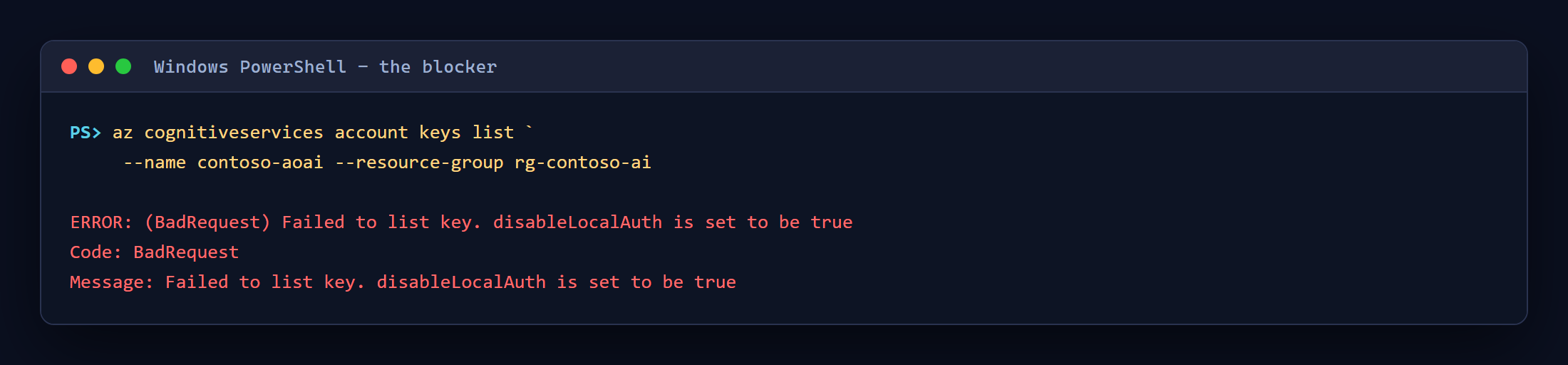
That is not a permissions gap you can fix with a role assignment. It is a tenant security posture. In the subscription this was built against, all 14 OpenAI and AI Services accounts were set that way.
So you look for the Entra ID route, and the same MS Learn page says, under Troubleshooting:
Entra ID support is currently not available for Codex.
Read together, the two statements leave no working configuration.
The measurement
Both statements are true, and the conclusion drawn from them is wrong.
Codex transmits the env_key value as an Authorization: Bearer header. The Azure v1 API
surface (/openai/v1) accepts Microsoft Entra access tokens on that header. So a token obtained
from az and placed in that variable authenticates — no key involved.
You can confirm this in two commands, before installing anything:
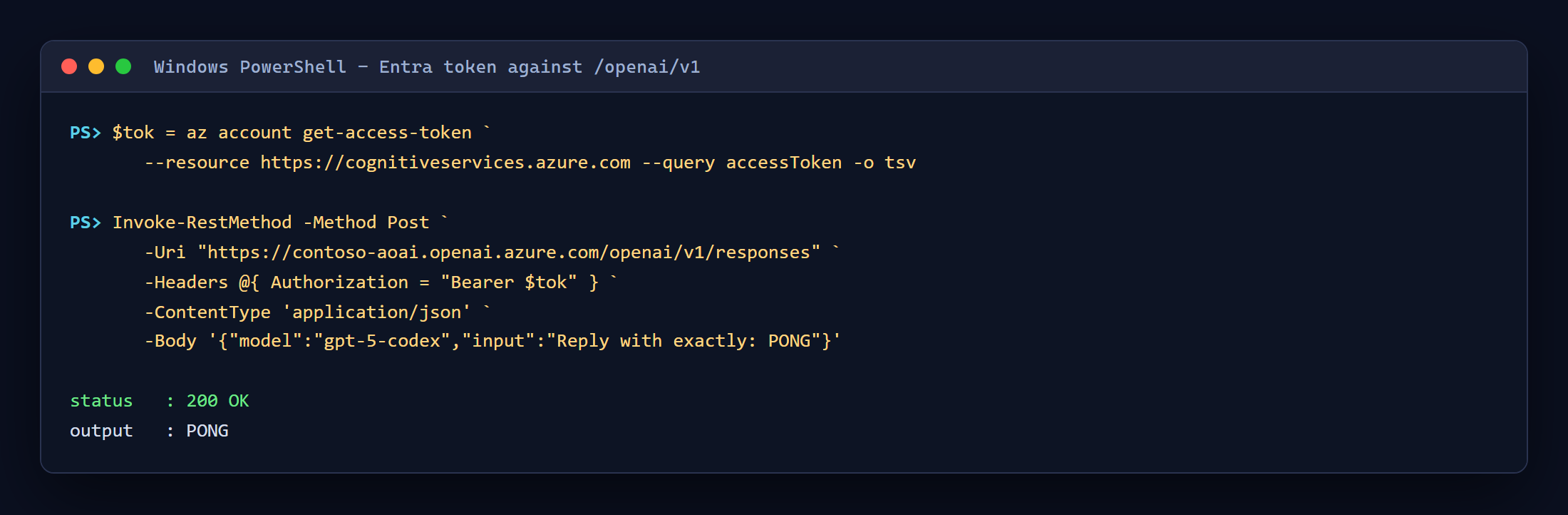
200 OK. The endpoint accepts the token.
What the documentation means is that Codex has no native Entra integration: it never calls
Microsoft Entra ID, never notices az login, and never refreshes a token when one expires. It does
not reject one. That distinction is the whole article — and it is also the catch, which
Known limits returns to.
Prerequisites
| Requirement | Notes |
|---|---|
| An Azure subscription with an Azure OpenAI or AI Services account | Local auth may be disabled; that is the point |
| A deployed reasoning model | gpt-5.3-codex, gpt-5-codex, gpt-5, gpt-6-astra, … |
| Azure CLI, signed in | az login |
| An RBAC role granting data-plane inference | Cognitive Services OpenAI User on the account |
| Node.js 20+ | Verified on 26.1.0 |
| Codex CLI | npm install -g @openai/codex@0.153.0 — pin it, see Step 1 |
WSL is not required. The MS Learn prerequisites list WSL2 for Windows; the CLI was verified running natively in PowerShell.
Step 1 — Install Codex CLI (and pin the version)
npm install -g @openai/codex@0.153.0
codex --version
Important Do not run a bare
npm install -g @openai/codex. At the time of writing, thelatestdist-tag resolved to0.155.0-alpha.9-win32-x64— a platform-specific prerelease that declares"bin": nulland ships the executable undervendor/<target-triple>/bin/. npm installs it and creates no shim, socodexdisappears from PATH entirely. This is how I lost a working install mid-session.
Check the dist-tag yourself before upgrading:
npm dist-tag ls @openai/codex
Step 2 — Confirm your deployment
Find the account name and deployment name. The account name is what you need — not a hostname.
az cognitiveservices account list --query "[].{name:name,group:resourceGroup}" -o table
az cognitiveservices account deployment list -n <resource> -g <group> --query "[].name" -o tsv
Note AI Services accounts publish
*.cognitiveservices.azure.comas their primary endpoint. That is not the inference host. The same account also publishes an*.openai.azure.comendpoint, and that is the one Codex needs. You can see both underproperties.endpoints.
Step 3 — Grant data-plane access
Reading the account with az is control-plane access; calling the model is not. Assign the
data-plane role to yourself if you do not already hold it:
az role assignment create `
  --assignee "<your-upn>" `
  --role "Cognitive Services OpenAI User" `
  --scope "/subscriptions/<sub>/resourceGroups/<group>/providers/Microsoft.CognitiveServices/accounts/<resource>"
A missing role shows up later as 401 or 403 from the model endpoint, not as a configuration
error.
Step 4 — Understand the configuration Codex needs
This is the file the wrapper in Step 5 generates for you. It is worth reading once, because three of the five lines are the ones people get wrong:
model = "gpt-5.3-codex"          # your DEPLOYMENT name, not the model family
model_provider = "azure"
model_reasoning_effort = "medium"

[model_providers.azure]
name = "Azure OpenAI"
base_url = "https://<resource>.openai.azure.com/openai/v1"   # /openai/v1, no /responses
env_key = "AZURE_OPENAI_API_KEY"                             # a VARIABLE NAME, never the value
wire_api = "responses"                                       # required for GPT-5+ / reasoning models
| Key | Common mistake |
|---|---|
base_url |
Using the cognitiveservices.azure.com host, omitting /openai/v1, or appending /responses — Codex appends it for you, giving /responses/responses |
env_key |
Pasting the credential in directly. It must name an environment variable |
wire_api |
Leaving it as chat. GPT-5+ reasoning models need responses, otherwise you get OperationNotSupported |
model |
Using the model family name instead of your deployment name |
Step 5 — Install the wrapper
The token has to be fetched and injected on every launch, because it expires. That is what
codex-on-azure does — a zero-dependency Node
wrapper that acquires a fresh Entra token, writes the config above into a local CODEX_HOME, and
starts Codex with the token passed in memory only.
git clone https://github.com/naveenneog/codex-on-azure.git
cd codex-on-azure
npm link
It installs nothing: the tool uses only the Node standard library.
Tip Your existing
~/.codex/config.tomlis never read or modified. The generated configuration goes to a separate.codex-azure/directory and is passed viaCODEX_HOME, so a personal Codex setup keeps working untouched.
Step 6 — Point it at your deployment
Nothing about any tenant is baked into the repo. Configure it with two environment variables:
$env:CODEX_AZURE_RESOURCE   = "<your-account-name>"
$env:CODEX_AZURE_DEPLOYMENT = "<your-deployment-name>"
or with a codex-azure.targets.json for several deployments:
{
  "default": "codex",
  "targets": {
    "codex": { "resource": "contoso-aoai", "deployment": "gpt-5.3-codex" },
    "fast":  { "resource": "contoso-aoai", "deployment": "gpt-5-mini" }
  }
}
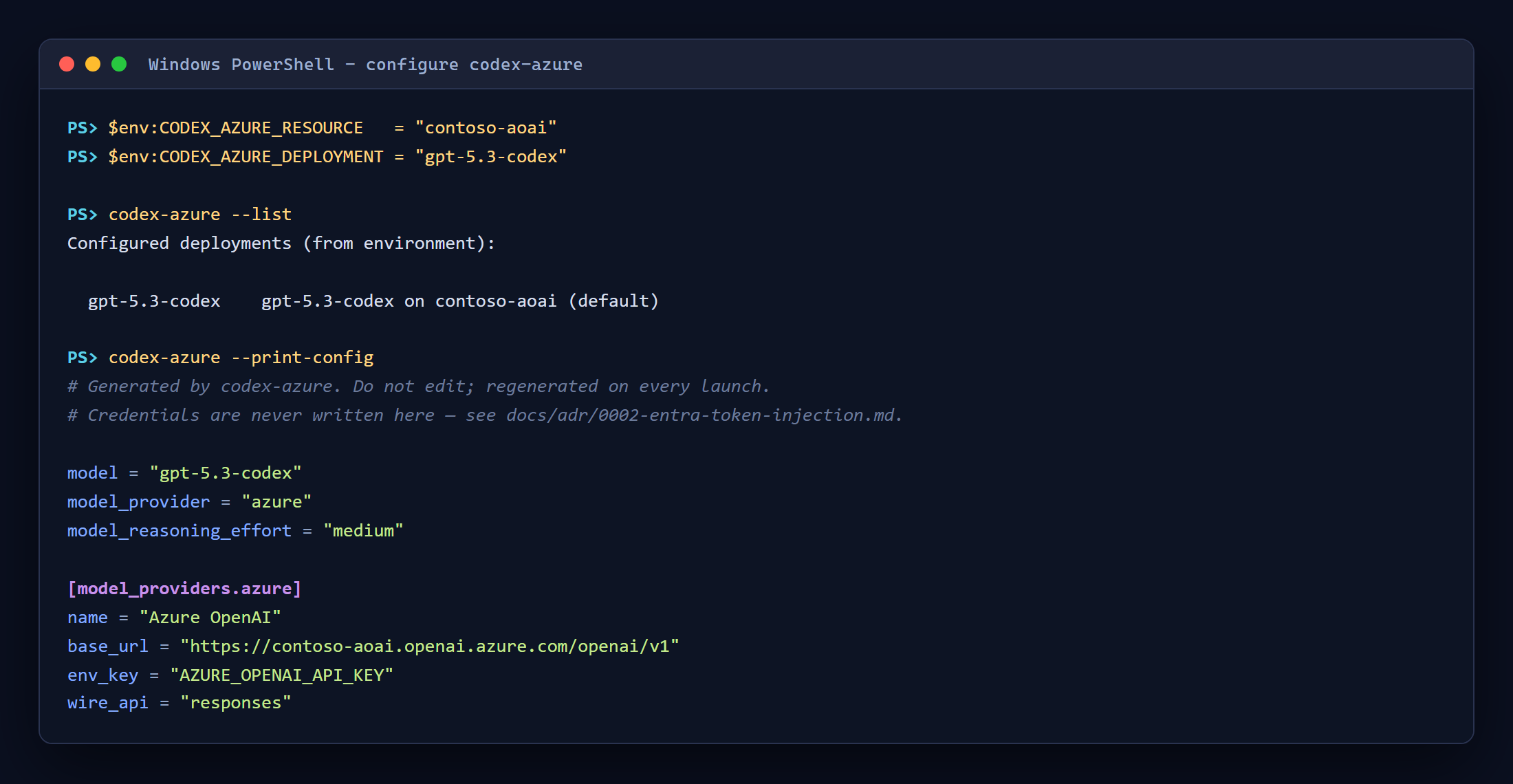
Then confirm what it resolved, without launching anything:
Step 7 — Run it
codex-azure                                   # interactive TUI
codex-azure -- exec "explain this repo"       # one-shot
codex-azure -m fast                           # another configured deployment
The session header is the proof: provider: azure, your deployment, and no key anywhere.
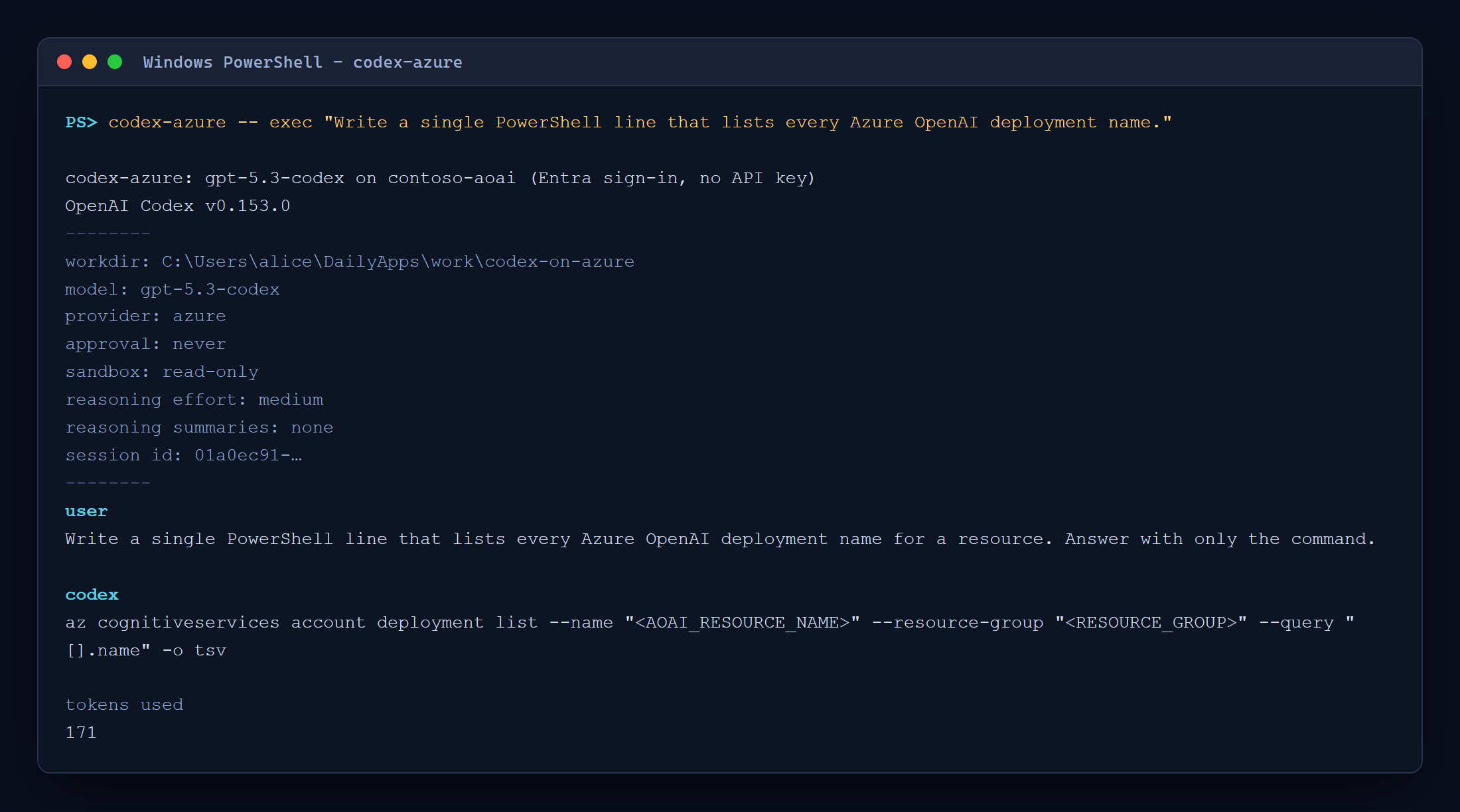
How the token reaches Codex safely
Two things in the wrapper are worth calling out, because both came from getting them wrong first.
The token never touches disk. It is passed to the child process in the environment, never
written into config.toml, never returned to callers, and never placed on a command line. A
generated config that somehow contained a credential is rejected before it is written.
No child process is spawned through a shell. The first implementation used shell: true with
hand-written argument quoting, because npm installs codex as a .cmd shim on Windows and Node
refuses to spawn those otherwise. A review proved that exploitable: cmd.exe parses the command line
before the callee does, has no backslash escape for quotes, and expands %VAR% even inside them.
An ordinary prompt containing a quote followed by & executed an arbitrary command — and could read
the live Entra token straight out of the child’s environment.
The fix was not better escaping. It was removing the shell: resolve the real executable (the Node
entry the shim wraps) and spawn with shell: false and an argument array. A second finding in the
same review: a bare az was resolvable from the current directory before PATH, so a planted
az.bat in any repository would have run against a signed-in user. Same fix, applied to both.
That story, with the options considered and rejected, is ADR-0003 in the repo.
Step 8 — Verify
The repo ships its own proof, and you can run it:
node --test                               # offline suite
npm run test:live                         # adds a real Azure round trip
node scripts/mutate.mjs                   # mutation harness
node .ironclad/gate.mjs --stage packet    # definition of done
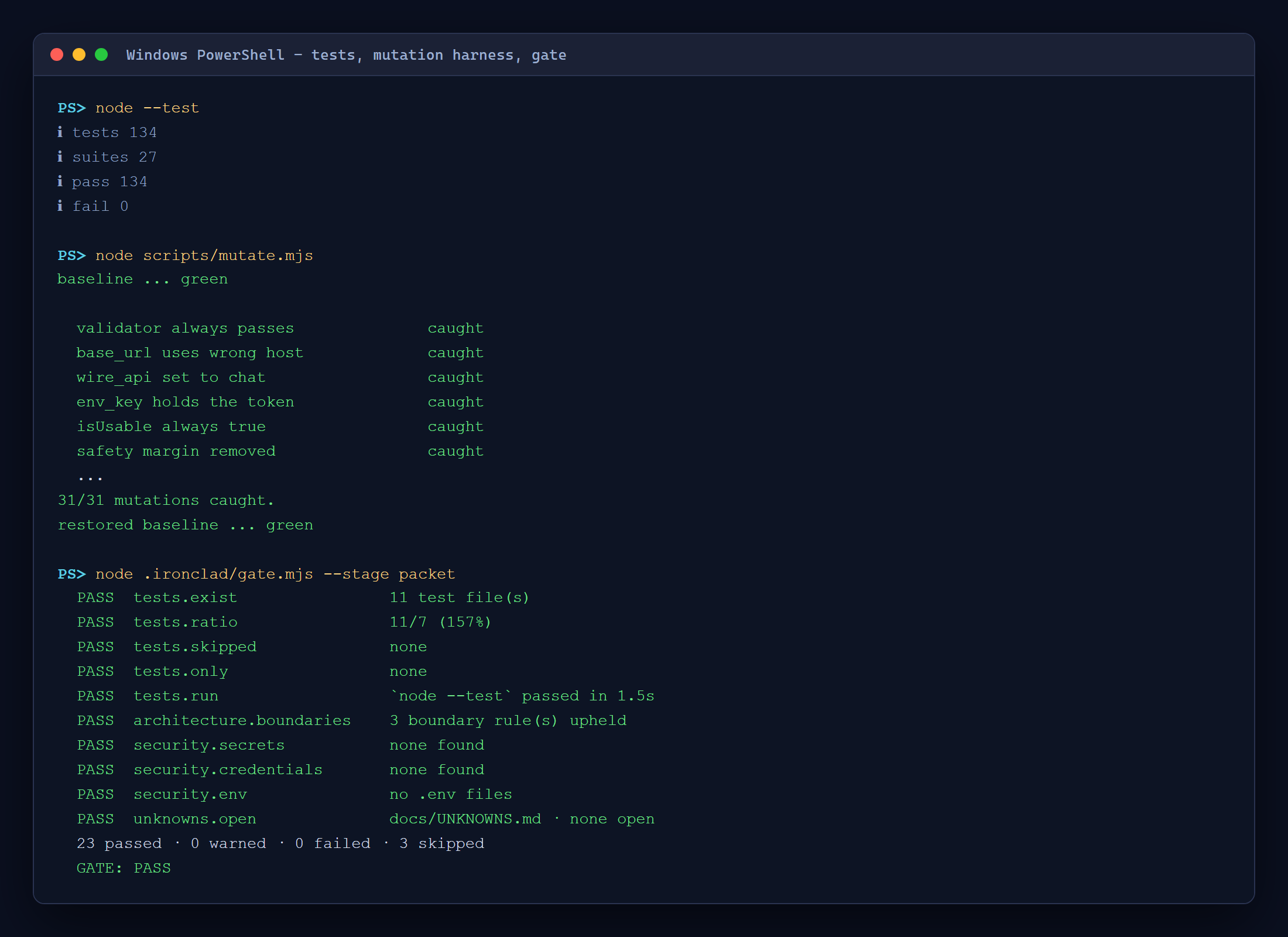
The middle one matters most. A passing test suite proves nothing on its own, so mutate.mjs breaks
one guarded behaviour at a time — including re-enabling shell: true — and fails if the tests do
not notice. 31 of 31 caught. It also fails when a mutation’s anchor is missing or matches more
than once, which caught a mutation that had been silently measuring the wrong line.
Known limits
Read these before you rely on it.
| Limit | Detail |
|---|---|
| Token lifetime ~55–60 min | Codex cannot refresh a credential. A session running past expiry fails with 401. A fresh token is acquired per launch, so restarting fixes it |
| Bearer forwarding is observed, not contracted | Codex forwarding env_key as a bearer token is current behaviour, not documented API. A live test fails on a real request if that ever changes |
| Token is in Codex’s environment | Processes Codex spawns inherit it. It is a delegated user token, short-lived but broad |
| One launch at a time | The generated config directory is shared between launches |
gpt-6-astra warns |
Model metadata not found on 0.141.0 and 0.153.0, which MS Learn lists as validated. It still answers; gpt-5.3-codex runs clean |
Troubleshooting
| Symptom | Cause and fix |
|---|---|
Failed to list key. disableLocalAuth is set to be true |
Working as intended. There is no key; use this guide |
401 / 403 from the model |
Missing data-plane role. Assign Cognitive Services OpenAI User (Step 3) |
401 after about an hour |
Token expired. Relaunch |
OperationNotSupported |
wire_api is not responses |
404 or /responses/responses in the URL |
base_url is wrong — it must end at /openai/v1 |
codex not found after upgrading |
The latest npm tag has no bin. Pin @openai/codex@0.153.0 (Step 1) |
ENOTFOUND / DNS error |
base_url uses the cognitiveservices.azure.com host instead of openai.azure.com |
Why the repo looks like that
codex-on-azure was built test-first, with every
architectural decision written down as an ADR and an executable gate as the definition of done.
The most useful file is docs/UNKNOWNS.md:
a register where each thing that was not known is closed either by a measurement with a date, or by
an explicitly labelled assumption with the detector that would catch it being wrong. “Does Codex
send the key as a bearer token?” started life there as an open question, not an assumption — which
is the only reason the contradiction in the docs got resolved by measuring instead of by guessing.
Both security defects in this tool were found by review, not by tests. The tests at the time
covered & and | — but never next to a quote, which is exactly where the bug lived.
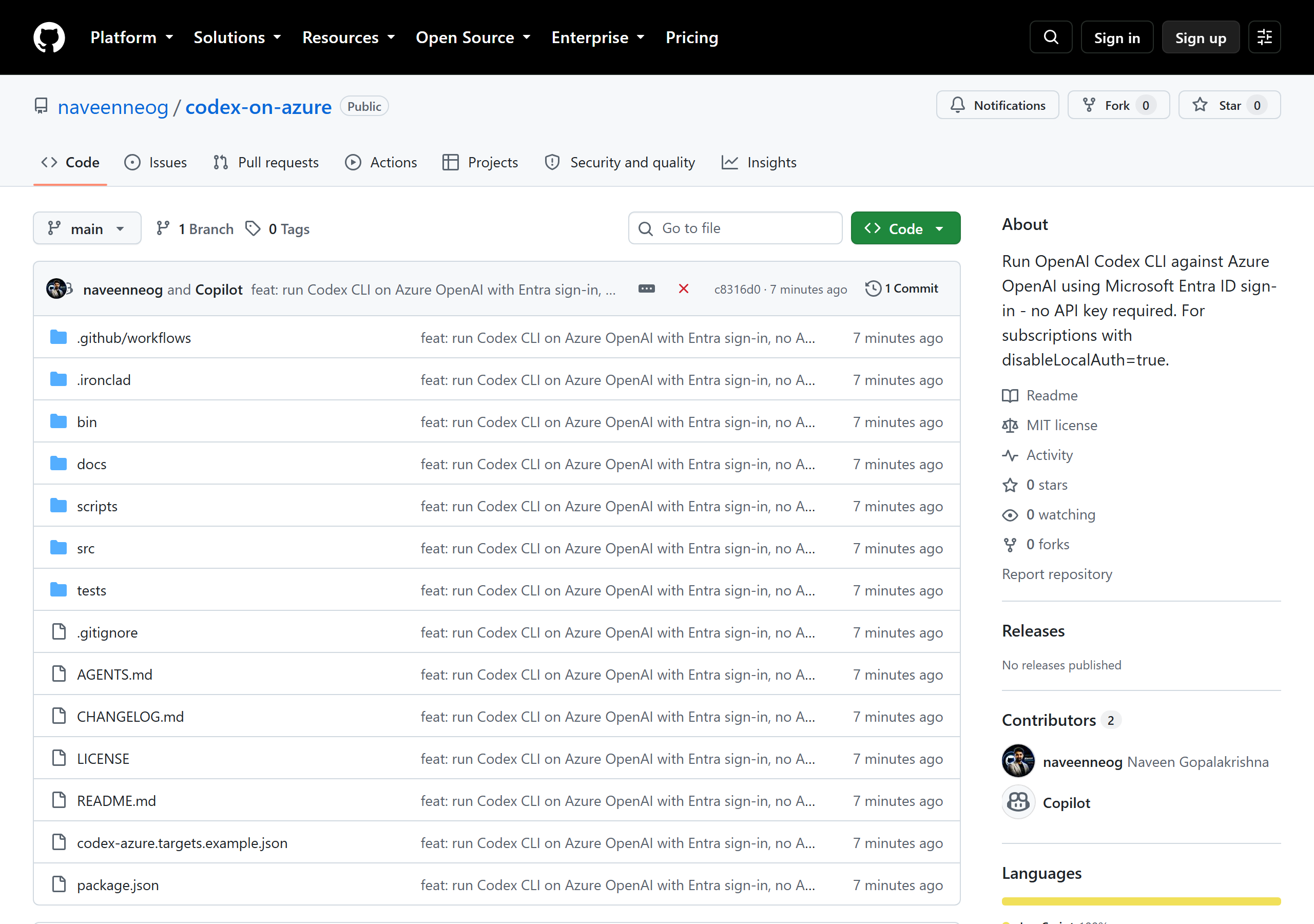
Reference
- 💻 Repo: github.com/naveenneog/codex-on-azure
- 📄 Codex with Azure OpenAI — Microsoft Learn
- 📄 Azure OpenAI v1 API lifecycle
- 📄 Codex CLI configuration reference
- 🔐 ADR-0002 — why an Entra token is injected
- 🔐 ADR-0003 — why no child process uses a shell
Doing the same thing with Anthropic’s tooling? See Run Claude Code on Microsoft Foundry.