
Run Claude Code on Microsoft Foundry: Step-by-Step Setup for VS Code and the CLI
Step-by-step instructions to point Anthropic's Claude Code at Claude models deployed in your own Microsoft Foundry resource, authenticated with Microsoft Entra ID. VS Code extension setup first, then the CLI, then verification. No API keys, no proxy.
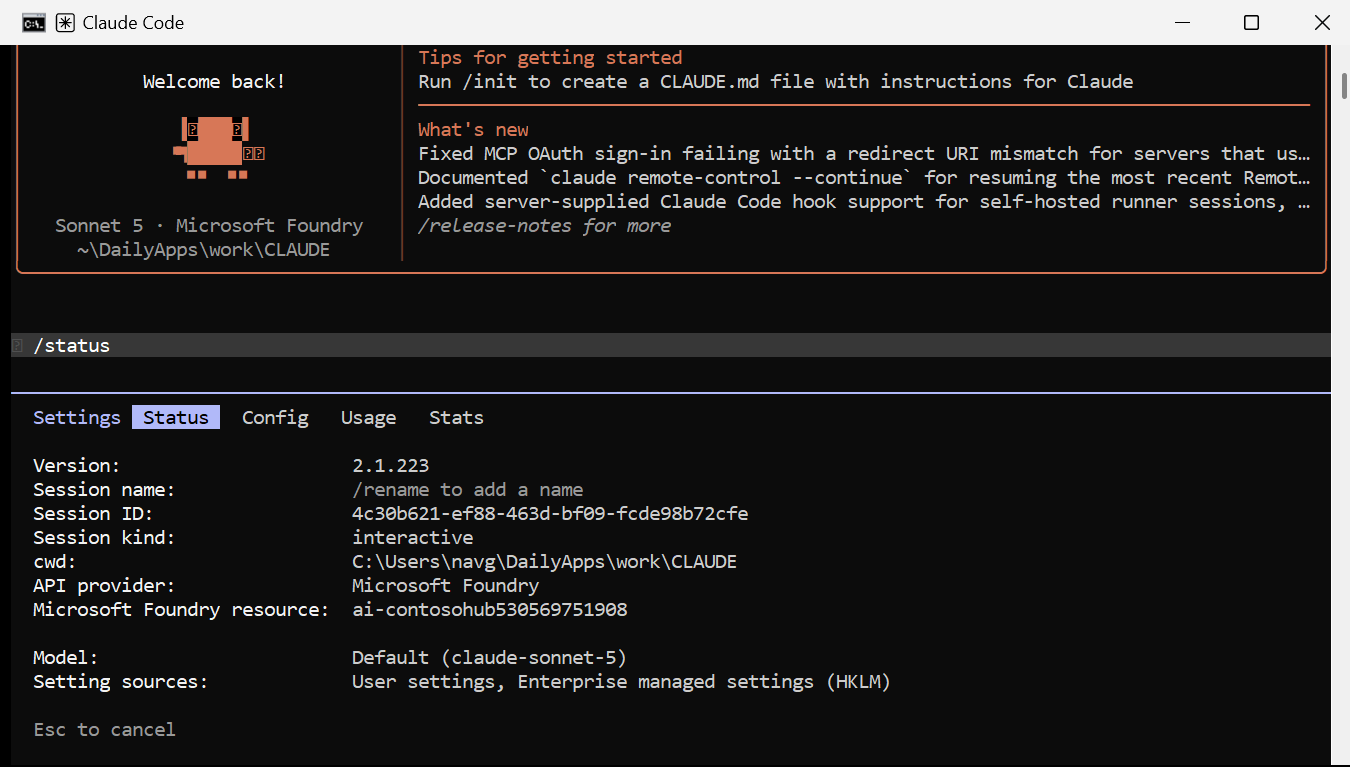
Claude Code can run against Claude models deployed in your own Microsoft Foundry resource,
authenticated with Microsoft Entra ID — az login on a workstation, managed identity on
Azure compute. No Anthropic account, no API key on disk, no proxy.
This is the procedure. Steps 1–3 are shared setup, Step 4 is the VS Code extension, Step 5 is the CLI, Step 6 verifies. Steps 4 and 5 are independent — do either or both.
Verified on 13 Aug 2026, Claude Code v2.1.223, against claude-sonnet-5 and
claude-opus-5 in East US 2.
Step 0 — Find your values (start here)
The whole setup needs five values. Here is what each one looks like, where it lives, and the command that prints it. Examples below are real values from my own subscription with a few characters masked.
| Value | Example | Used for |
|---|---|---|
| Subscription ID | e839ff0f-532b-4828-****-****19d85 |
az account set |
| Resource group | rg-cont****hub |
every az ... -g flag |
| Foundry resource name | ai-contosohub****751908 |
ANTHROPIC_FOUNDRY_RESOURCE |
| Region | eastus2 |
checking model availability |
| Deployment names | claude-sonnet-5, claude-opus-5 |
the three model aliases |
Where they live in the Azure portal
Open portal.azure.com → search your Foundry resource by name → Overview. Everything except the deployment names is on this one blade:
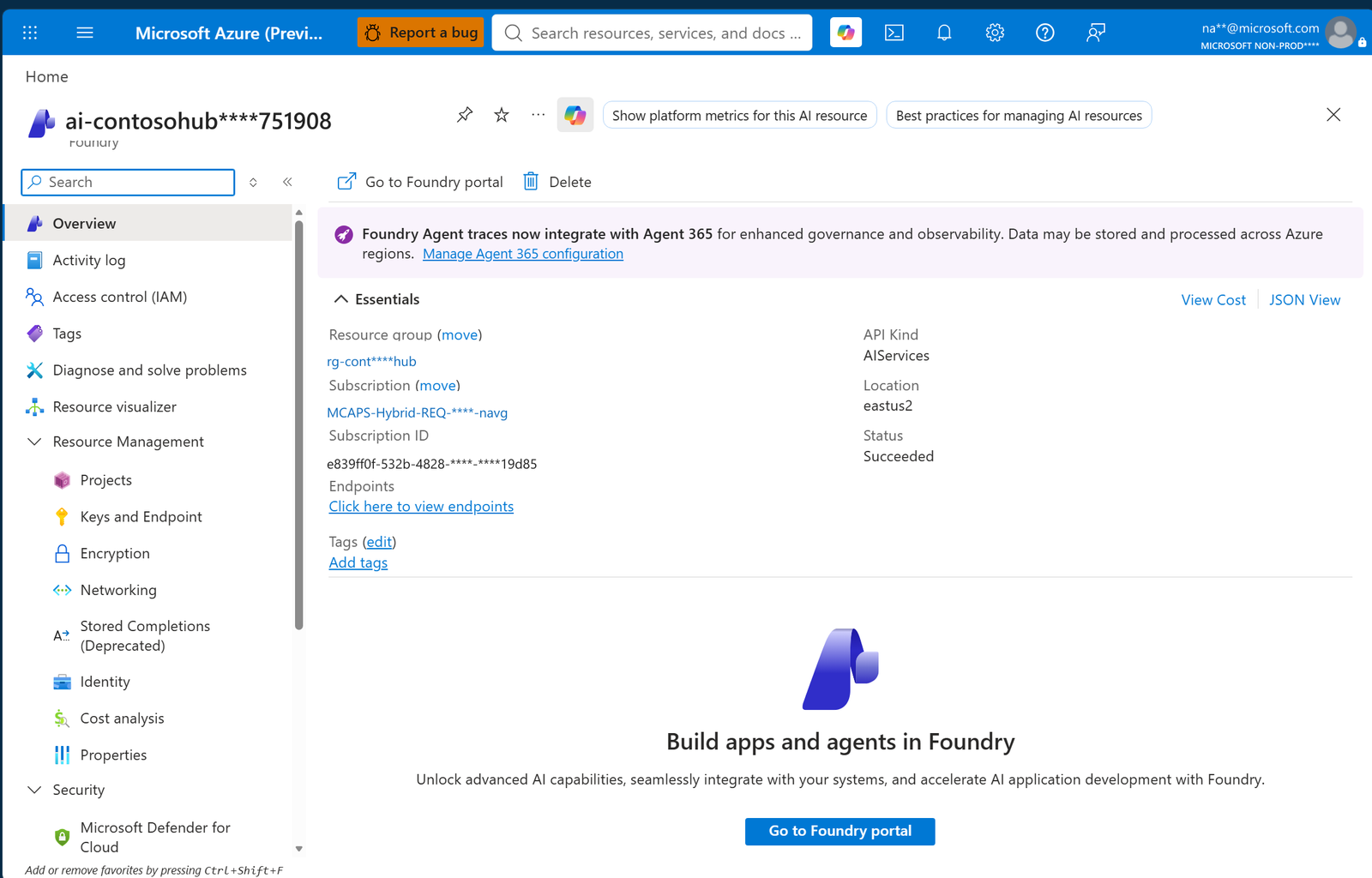
Read off:
- Resource name — the page title.
API Kindmust sayAIServices. - Resource group and Subscription / Subscription ID — in Essentials.
- Location — the region, for Step 1.
- Keys and Endpoint (left nav, under Resource Management) — the endpoint URLs.
- Access control (IAM) (left nav) — where you add the role in Step 2.
Deployment names are not in the Azure portal. Click Go to Foundry portal at the top of that blade, then View deployments on the project home — or just use the CLI below, which is faster.
Or get everything from the CLI
az login

# subscription + tenant
az account show --query "{subscription:id, tenant:tenantId, user:user.name}" -o table

# every Foundry resource you can see, with its resource group and region
az cognitiveservices account list `
    --query "[?kind=='AIServices'].{name:name, rg:resourceGroup, region:location}" -o table

# the deployment names on one of them
az cognitiveservices account deployment list -n <resource> -g <rg> -o table
Or run Get-FoundryValues.ps1,
which finds every value, checks the RBAC role, and prints the exact config block to paste into
Steps 4 and 5. With no arguments it scans your subscription and picks a resource that actually
has Claude deployments. Add -Mask when screenshotting or pasting into a ticket:
.\Get-FoundryValues.ps1 -Mask
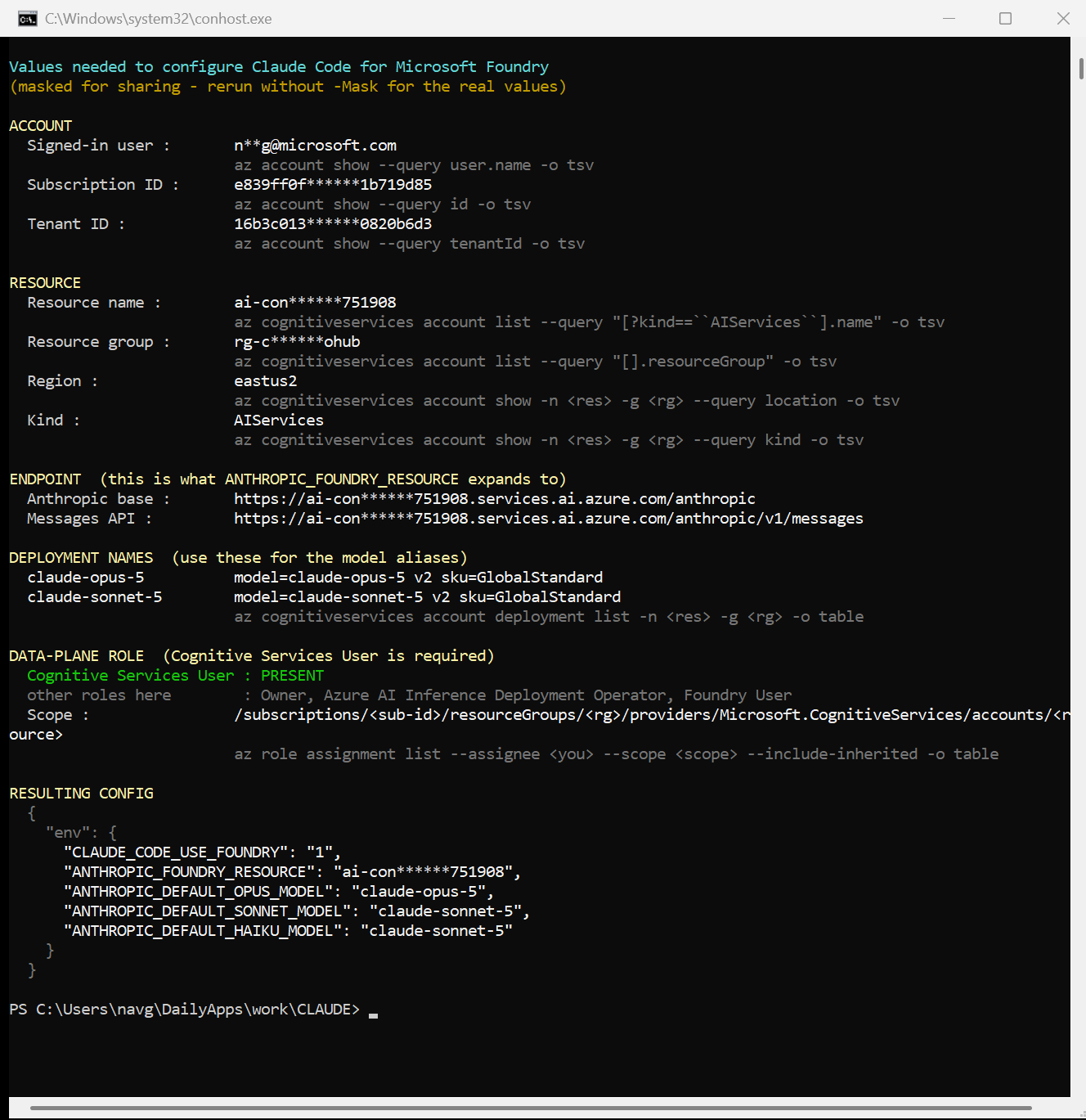
The last block is the config you need — copy it straight into Step 4.2 or 5.2.
Prerequisites
| Requirement | Check |
|---|---|
Foundry resource, kind AIServices |
az cognitiveservices account show -n <res> -g <rg> --query kind -o tsv |
| Claude models deployed | Step 1 |
Cognitive Services User on the resource |
Step 2 |
| Azure CLI | az --version |
| Node.js 18+ | node --version |
| VS Code 1.94+ | code --version |
If you don’t yet know your resource name, resource group or deployment names, do Step 0 first.
Step 1 — Confirm your Claude deployments
az cognitiveservices account deployment list -n <resource> -g <rg> -o table
Note the deployment names in the output. These are the names you configure later — they are yours, not Anthropic’s catalogue names.
To create a deployment:
az cognitiveservices account deployment create `
    -n <resource> -g <rg> `
    --deployment-name claude-haiku-4-5 `
    --model-name claude-haiku-4-5 --model-version 2 --model-format Anthropic `
    --sku-name GlobalStandard --sku-capacity 1
To list what your region offers:
az cognitiveservices model list -l <region> -o json |
    ConvertFrom-Json |
    Where-Object { $_.model.format -eq 'Anthropic' } |
    ForEach-Object { $_.model.name } | Sort-Object -Unique
If deployment creation fails with a Marketplace error — Claude models bill through Azure Marketplace. Internal, sandbox, CSP, student and sponsored-credit subscriptions are blocked from creating them:
ERROR: Marketplace purchases are disabled for this subscription due to policy restrictions.Existing deployments keep working. Map the missing alias to a deployment you do have (Step 4.2).
Step 2 — Grant data-plane access
Owner on the subscription is not sufficient — that is control plane. Inference needs the
data-plane role Cognitive Services User (a97b65f3-24c7-4388-baec-2e87135dc908).
$scope = az cognitiveservices account show -n <resource> -g <rg> --query id -o tsv

az role assignment create `
    --assignee "<upn-or-object-id>" `
    --role "Cognitive Services User" `
    --scope $scope
Verify:
az role assignment list --assignee "<you>" --scope $scope --include-inherited -o table
Step 3 — Sign in with Entra ID
Workstation:
az login
az account set --subscription <subscription-id>
Azure compute (VM, Container App, DevBox) — managed identity:
az login --identity                          # system-assigned
az login --identity --username <client-id>   # user-assigned
Assign the same role from Step 2 to the identity:
az role assignment create `
    --assignee-object-id <managed-identity-principal-id> `
    --assignee-principal-type ServicePrincipal `
    --role "Cognitive Services User" `
    --scope $scope
Confirm a token is obtainable:
az account get-access-token --resource https://cognitiveservices.azure.com --query expiresOn -o tsv
Both
https://cognitiveservices.azure.comandhttps://ai.azure.comare accepted scopes.
Optional — prove the endpoint answers before involving Claude Code at all:
$t = az account get-access-token --resource https://cognitiveservices.azure.com --query accessToken -o tsv

Invoke-RestMethod -Method Post `
    -Uri "https://<resource>.services.ai.azure.com/anthropic/v1/messages" `
    -Headers @{ Authorization = "Bearer $t"; 'anthropic-version' = '2023-06-01' } `
    -ContentType 'application/json' `
    -Body '{"model":"claude-sonnet-5","max_tokens":32,"messages":[{"role":"user","content":"Reply with exactly: FOUNDRY-OK"}]}'
Step 4 — VS Code extension setup
4.1 Install the extension
code --install-extension anthropic.claude-code
Or: Ctrl+Shift+X → search Claude Code → Install (publisher: Anthropic).
The extension bundles its own engine. The npm CLI in Step 5 is not required for the panel to work.
4.2 Configure
Open Ctrl+Shift+P → Preferences: Open User Settings (JSON) and add:
{
  "claudeCode.environmentVariables": [
    { "name": "CLAUDE_CODE_USE_FOUNDRY",        "value": "1" },
    { "name": "ANTHROPIC_FOUNDRY_RESOURCE",     "value": "<your-resource-name>" },
    { "name": "ANTHROPIC_DEFAULT_OPUS_MODEL",   "value": "claude-opus-5" },
    { "name": "ANTHROPIC_DEFAULT_SONNET_MODEL", "value": "claude-sonnet-5" },
    { "name": "ANTHROPIC_DEFAULT_HAIKU_MODEL",  "value": "claude-haiku-4-5" }
  ]
}
Rules:
ANTHROPIC_FOUNDRY_RESOURCEis the resource name, not a URL. Claude Code expands it tohttps://<resource>.services.ai.azure.com/anthropic.- Pin all three model aliases to deployment names that exist. Foundry mode does no start-up
model check, so a wrong alias fails mid-task as
DeploymentNotFound, not at launch. Ifclaude-haiku-4-5is not deployed, set the haiku alias to your Sonnet deployment. - Set no key. Leaving
ANTHROPIC_FOUNDRY_API_KEYandANTHROPIC_FOUNDRY_AUTH_TOKENunset is what makes Claude Code fall through toDefaultAzureCredential.
If you also complete Step 5, ~/.claude/settings.json alone is sufficient for the extension and
this block is redundant — I tested that by deleting it and re-running. Either location works.
4.3 Reload and open the panel
- Ctrl+Shift+P →
Developer: Reload Window - Ctrl+Shift+P →
Claude Code: Open in Side Bar
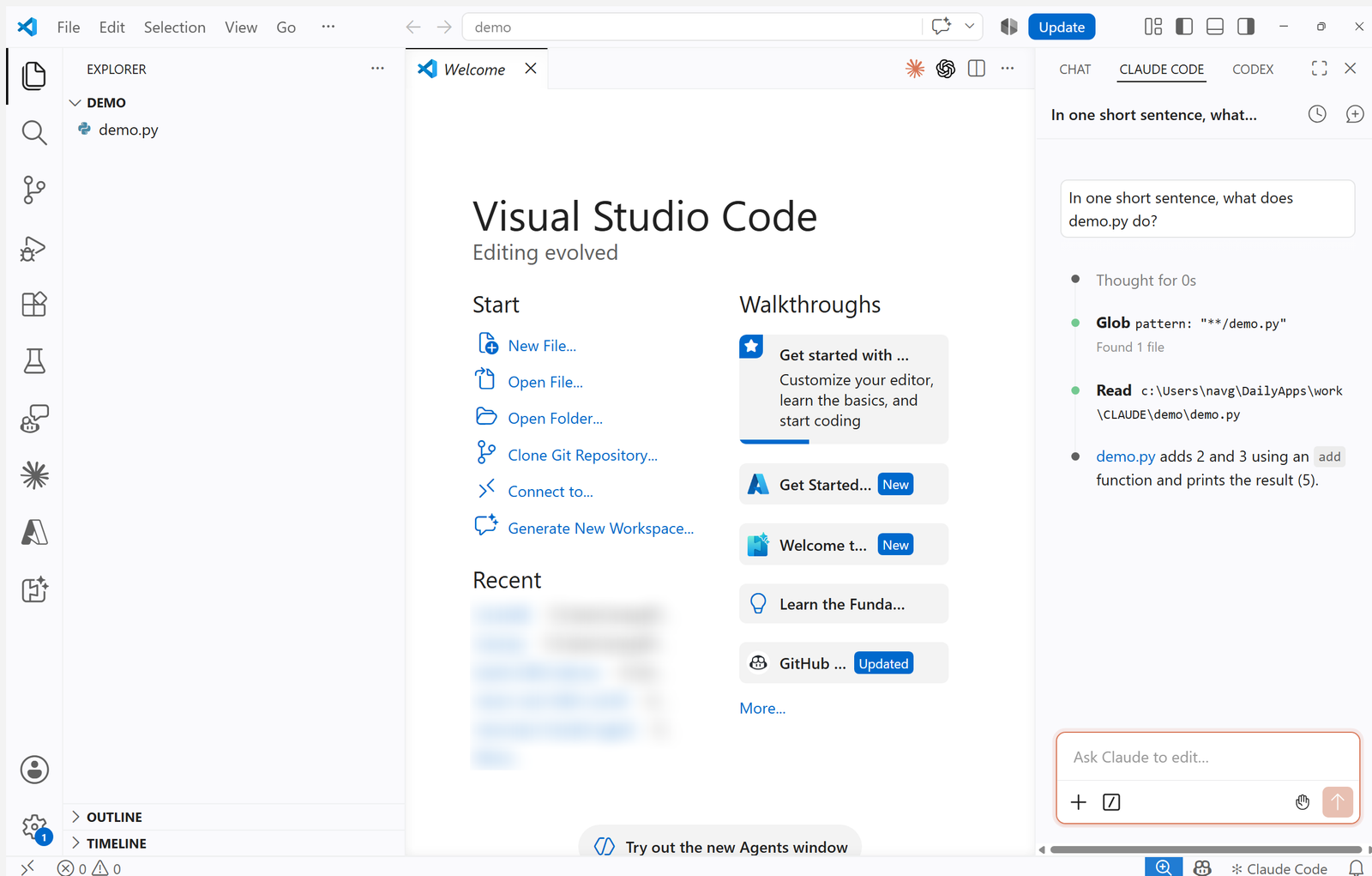
The panel opens straight into a usable prompt. There is no sign-in step — that absence is the first signal Entra ID resolved.
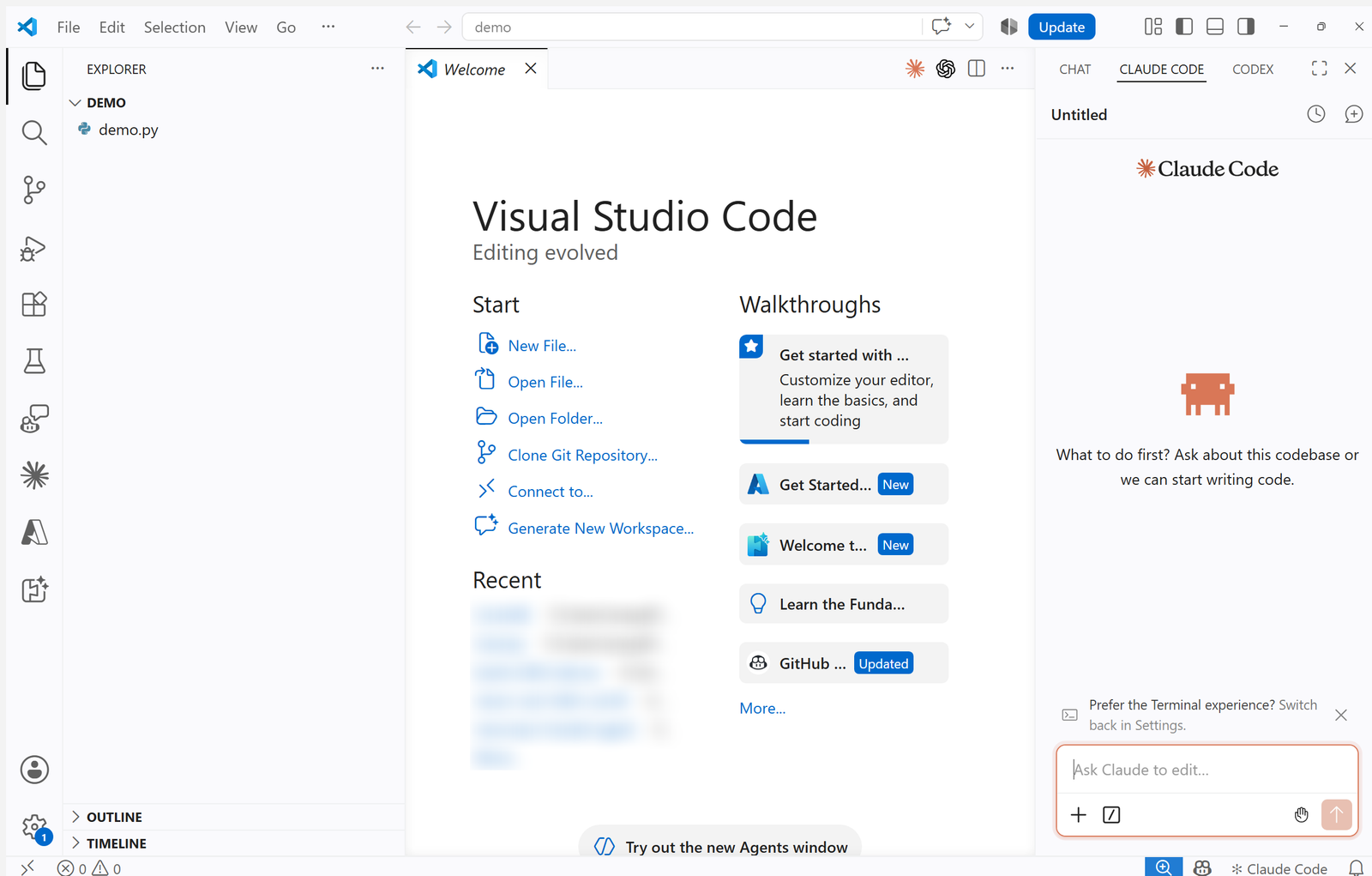
4.4 Confirm it answers
Type any question about the open folder and send it. The panel calls its normal file tools and answers from your Foundry deployment.
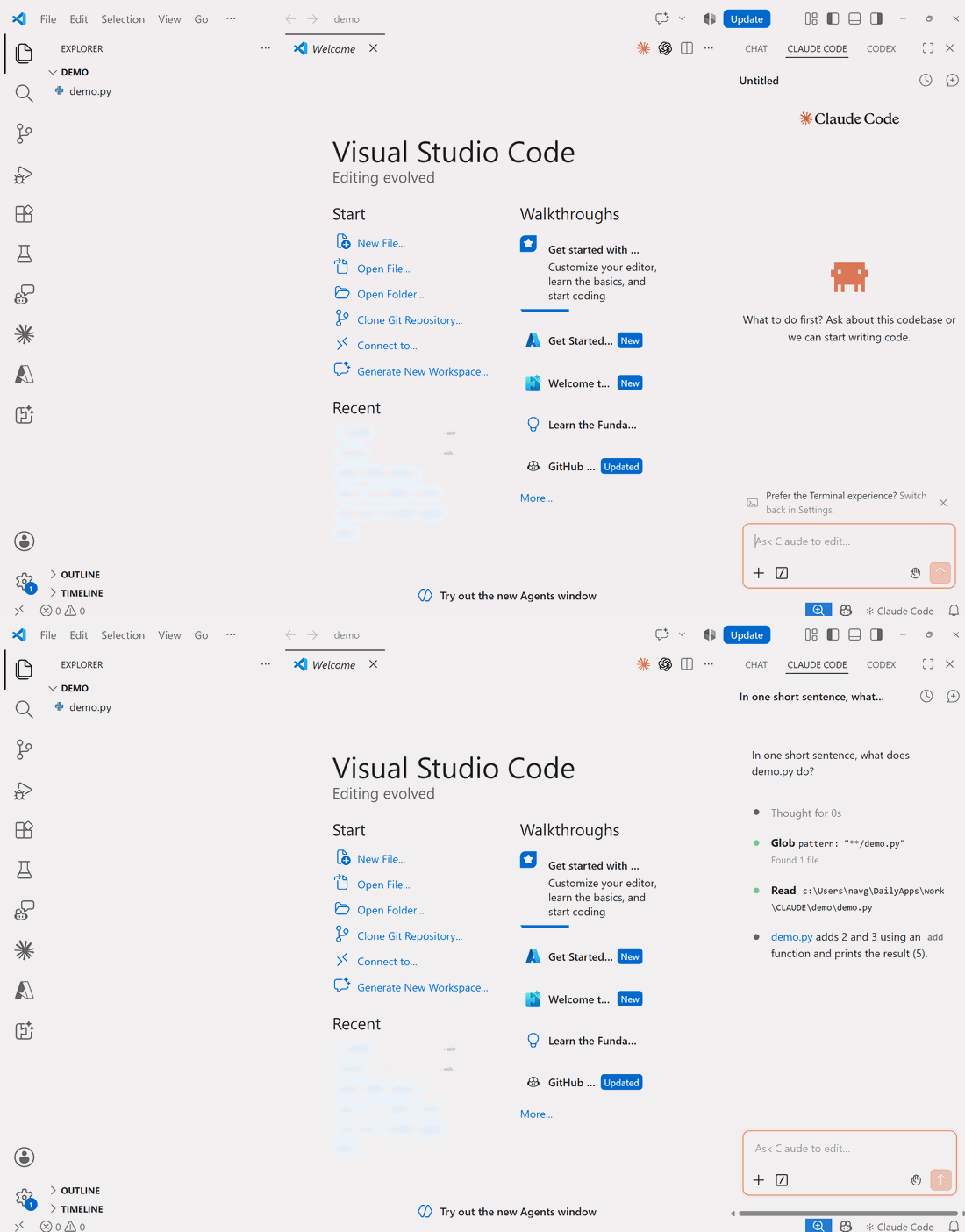
/statusdoes not work in the panel — it returns “/status isn’t available in this environment.” Use Step 5.3 to inspect the provider.
Step 5 — Claude Code CLI setup
5.1 Install
npm install -g @anthropic-ai/claude-code
claude --version
5.2 Configure
Create or edit %USERPROFILE%\.claude\settings.json (~/.claude/settings.json on macOS/Linux):
{
  "$schema": "https://json.schemastore.org/claude-code-settings.json",
  "env": {
    "CLAUDE_CODE_USE_FOUNDRY": "1",
    "ANTHROPIC_FOUNDRY_RESOURCE": "<your-resource-name>",
    "ANTHROPIC_DEFAULT_OPUS_MODEL": "claude-opus-5",
    "ANTHROPIC_DEFAULT_SONNET_MODEL": "claude-sonnet-5",
    "ANTHROPIC_DEFAULT_HAIKU_MODEL": "claude-haiku-4-5"
  }
}
Same three rules as 4.2. For a one-off session, use environment variables instead:
$env:CLAUDE_CODE_USE_FOUNDRY    = "1"
$env:ANTHROPIC_FOUNDRY_RESOURCE = "<your-resource-name>"
claude
5.3 Verify the provider
claude auth status
{ "loggedIn": true, "authMethod": "third_party", "apiProvider": "foundry" }
claude doctor
CLAUDE_CODE_USE_FOUNDRY is set, so this session is using Microsoft Foundry
- Not connected to the Anthropic API (api.anthropic.com)
- Not signed in to claude.ai
Then start an interactive session and run /status — it reports API provider: Microsoft
Foundry and the resource name (the screenshot at the top of this post).
claude
5.4 One headless check
claude -p "Reply with exactly: FOUNDRY-OK" --output-format json
Look for "provider":"foundry" and "canonicalModel":"claude-sonnet-5" in modelUsage.
Step 6 — Verify end to end
Run the seven-point check (Test-ClaudeFoundry.ps1):
.\Test-ClaudeFoundry.ps1 -Resource <resource> -ResourceGroup <rg>
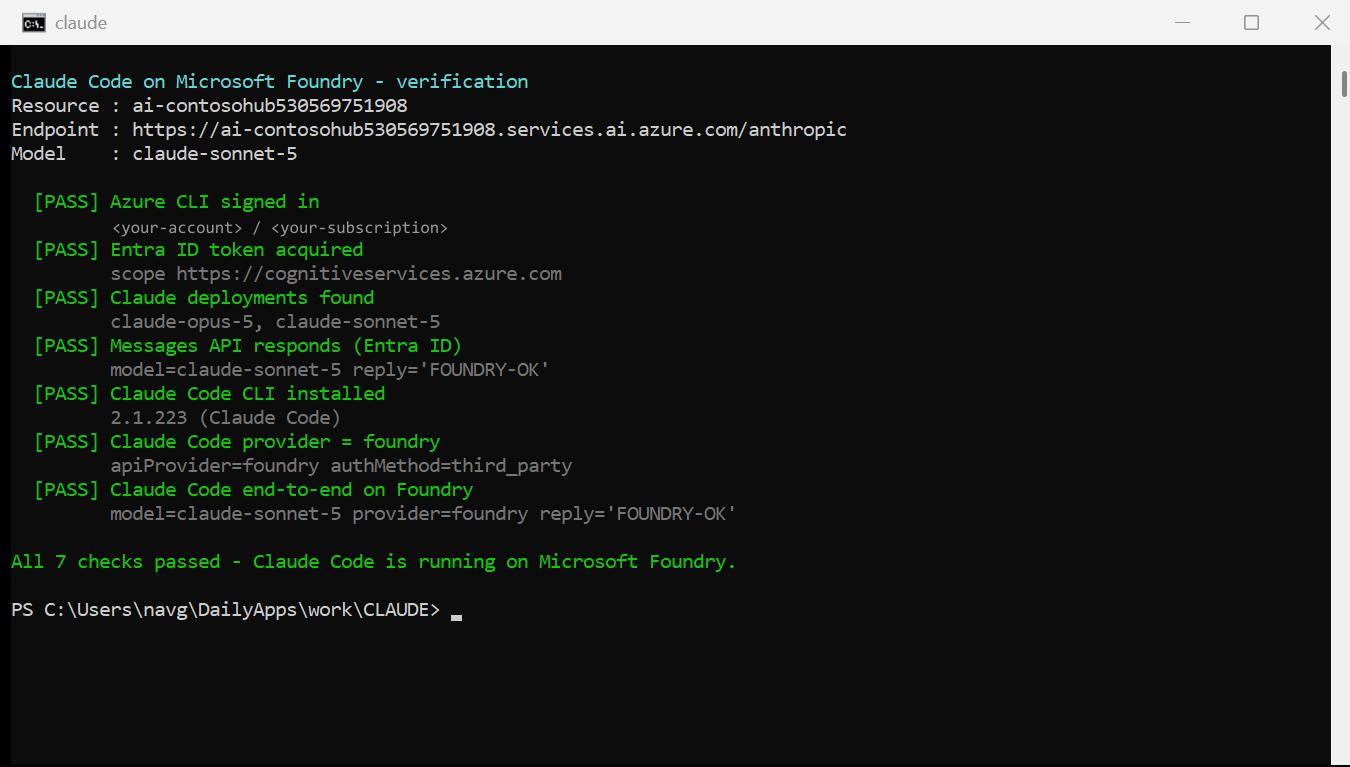
| # | Check |
|---|---|
| 1 | Azure CLI signed in |
| 2 | Entra ID data-plane token acquired |
| 3 | Claude deployments exist on the resource |
| 4 | /anthropic/v1/messages responds over Entra ID auth |
| 5 | Claude Code CLI installed |
| 6 | claude auth status reports foundry |
| 7 | A real Claude Code turn completes on Foundry |
It exits non-zero on failure, so it drops into CI unchanged.
Confirm from the Azure side that traffic reached the resource:
$rid = az cognitiveservices account show -n <resource> -g <rg> --query id -o tsv
az monitor metrics list --resource $rid --metric TokenTransaction `
    --start-time (Get-Date).ToUniversalTime().AddHours(-1).ToString('yyyy-MM-ddTHH:mm:ssZ') `
    --interval PT5M --aggregation Total -o table
Reference
Endpoint
POST https://<resource>.services.ai.azure.com/anthropic/v1/messages
     Authorization: Bearer <entra-id-token>
     anthropic-version: 2023-06-01
     Content-Type: application/json
Foundry exposes Claude through the native Anthropic Messages API, which is why no proxy is needed. Verified on a live resource:
| Path | Result |
|---|---|
/anthropic/v1/messages |
200 |
/anthropic/v1/messages/count_tokens |
200 |
/openai/v1/chat/completions |
404 api_not_supported |
/models/chat/completions |
404 api_not_supported |
/openai/deployments/<name>/chat/completions |
404 api_not_supported |
/anthropic/v1/models |
404 api_not_supported |
Streaming (SSE), tool use and count_tokens all work. ?api-version= is optional.
Environment variables
| Variable | Purpose |
|---|---|
CLAUDE_CODE_USE_FOUNDRY |
1 enables Foundry mode |
ANTHROPIC_FOUNDRY_RESOURCE |
Resource name; expands to the services.ai.azure.com/anthropic base URL |
ANTHROPIC_FOUNDRY_BASE_URL |
Full base URL override (gateways) |
ANTHROPIC_FOUNDRY_API_KEY |
Key auth instead of Entra ID |
ANTHROPIC_FOUNDRY_AUTH_TOKEN |
Pre-fetched bearer token; highest precedence |
ANTHROPIC_DEFAULT_SONNET_MODEL |
Deployment behind the sonnet alias |
ANTHROPIC_DEFAULT_OPUS_MODEL |
Deployment behind the opus alias |
ANTHROPIC_DEFAULT_HAIKU_MODEL |
Deployment behind haiku and background tasks |
Auth precedence: ANTHROPIC_FOUNDRY_AUTH_TOKEN → ANTHROPIC_FOUNDRY_API_KEY →
DefaultAzureCredential.
CLAUDE_CODE_USE_AZURE does not exist. Scanning the v2.1.223 binary shows all five
*_FOUNDRY_* variables present and no CLAUDE_CODE_USE_AZURE.
Troubleshooting
| Symptom | Cause → Fix |
|---|---|
DeploymentNotFound mid-task |
A model alias points at a deployment you do not have. Re-pin it (4.2 / 5.2). |
HTTP 401 invalid subscription key |
No usable Authorization header. Check Step 2 role and Step 3 sign-in. Authorization: Bearer wins when both it and x-api-key are sent. |
HTTP 404 api_not_supported |
OpenAI-shaped path. Claude deployments expose only /anthropic/*. |
| Extension prompts for Anthropic sign-in | Foundry variables not visible to it. Set them in claudeCode.environmentVariables or ~/.claude/settings.json, then Developer: Reload Window. Shell exports do not reach the extension. |
/status unavailable |
Panel-only limitation. Use claude auth status, or /status in a terminal session. |
| Marketplace error on deployment create | Subscription is blocked from Marketplace purchases. Reuse existing deployments or use a pay-as-you-go subscription. |
| Windows: helper returns a WSL error as the “token” | In Git Bash a bare az resolves to the WSL shim. Use az.cmd. Note command -v az.cmd also fails (bash ignores PATHEXT), so run the candidate and validate the result starts with eyJ. |
Scripts
Get-FoundryValues.ps1— finds every value in Step 0 and prints the config block (-Maskto share safely)Setup-ClaudeFoundry.ps1— writes both config files, backs up what is already thereTest-ClaudeFoundry.ps1— the seven checks in Step 6get-foundry-token.sh— optional token helper for CI (Azure CLI, then IMDS)
Docs: Anthropic — Claude Code on Microsoft Foundry · Microsoft Learn — Deploy and use Claude models in Foundry