
Can ChatGPT Enterprise Use Your Azure Subscription for Inference? A Validation Report
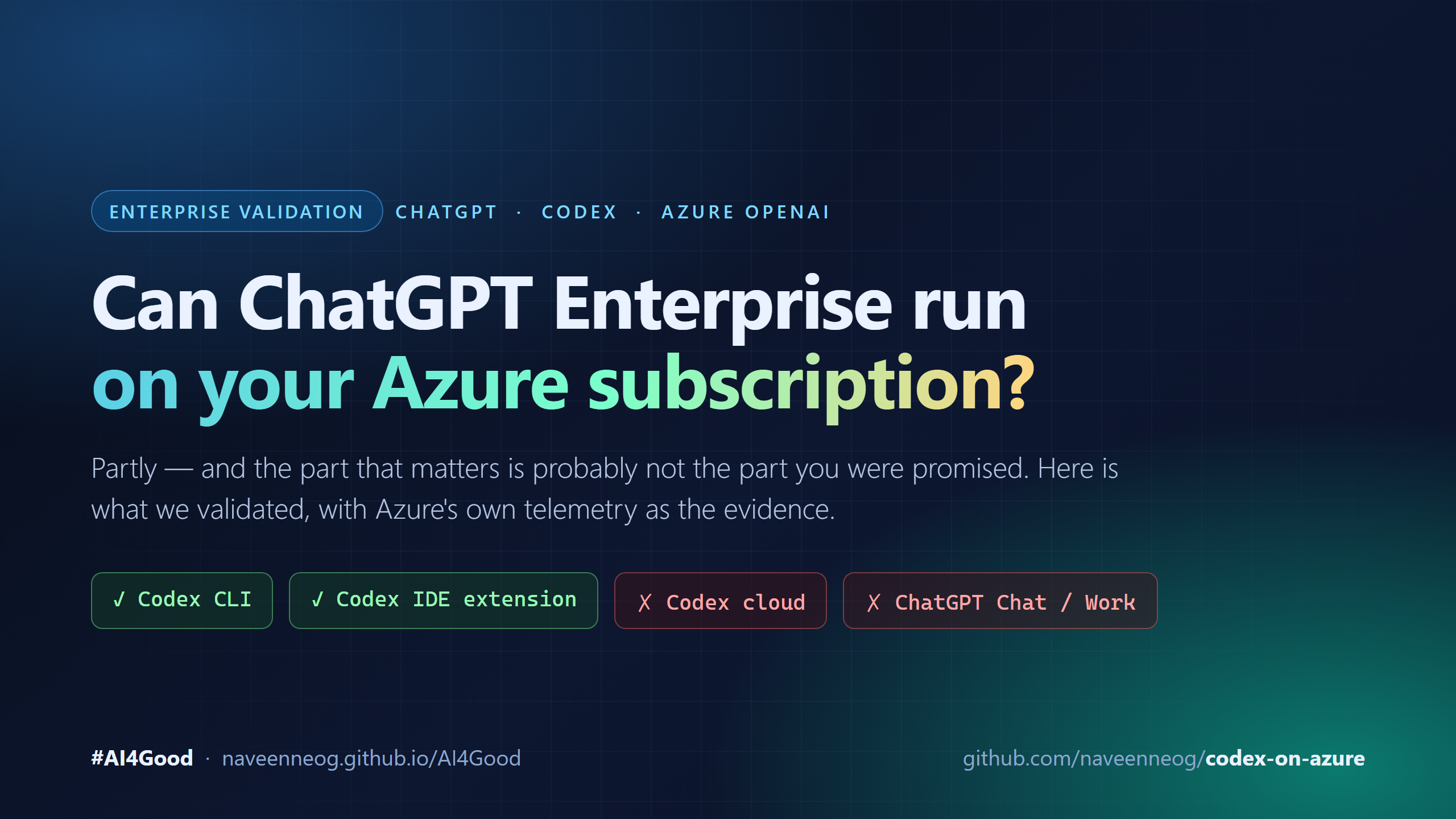
A customer asked whether ChatGPT Enterprise — Chat, Work and Codex — can route inference through their own Azure subscription so data stays inside their cloud boundary. Two of those surfaces can. Three cannot. Here is the validation, the scripts, and Azure-side evidence you can hand to an auditor.
A customer asked this, close to verbatim:
Can ChatGPT Enterprise — including Chat, Work, and Codex — use Azure for third-party inferencing? We want to route inference through an approved Azure subscription, consume OpenAI models via Azure AI Foundry, and ensure all data remains within our governed cloud boundaries.
It is a reasonable question with an uncomfortable answer: the surfaces they named and the capability they want do not line up. Some of it is supported and provable. Most of what people assume is supported, is not.
This is the validation — what was tested, what the primary sources say, and the scripts that let you reproduce it in your own tenant.
Validated 29 Sep 2026, codex-cli 0.153.0, Codex VS Code extension 26.908.40401,
against an Azure AI Services account with disableLocalAuth = true.
The short answer
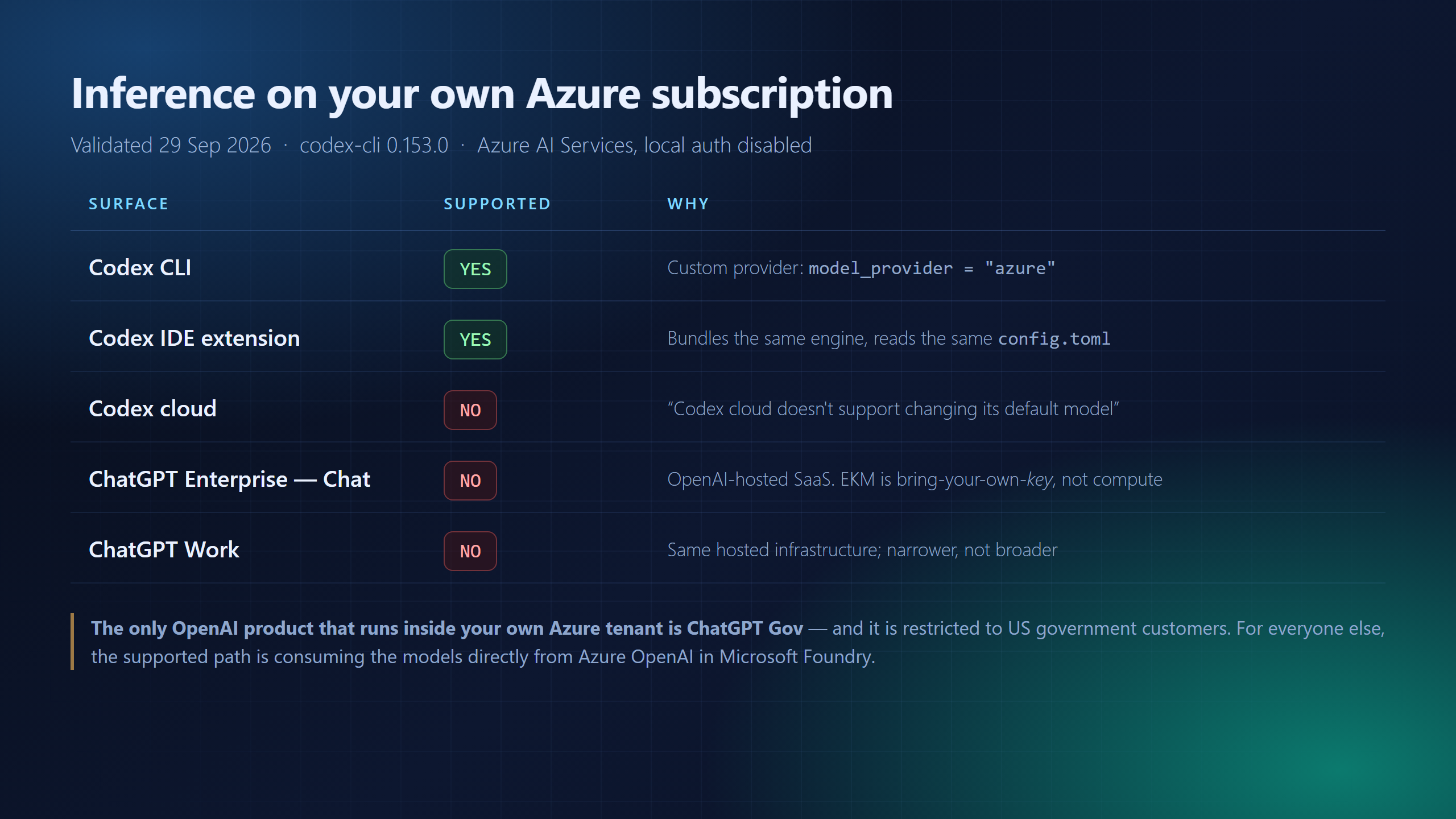
Important If the commitment being made to a customer is “ChatGPT Enterprise will run on our Azure subscription”, that commitment cannot be met today. The chat product is OpenAI-hosted SaaS. What can be met is the underlying need — OpenAI models, inference and data inside the customer’s own Azure tenant — but through a different product and a different commercial relationship.
Why the chat surfaces cannot
ChatGPT Enterprise runs on OpenAI’s infrastructure. The only “bring your own” mechanism is Enterprise Key Management, and it is bring-your-own-key, not bring-your-own-compute:
OpenAI supports Bring Your Own Key (BYOK) encryption with external accounts in AWS KMS, Google Cloud (GCP), and Azure Key Vault. — OpenAI, EKM overview
Azure Key Vault there wraps an encryption key. Compute never enters the customer tenant. This is the single most common misreading in the room — “we use Azure Key Vault with ChatGPT” gets heard as “ChatGPT runs in our Azure”.
Data residency is real, but it is not tenant custody. OpenAI does offer region-pinned inference:
Model inference (GPU execution) on in-scope customer content is performed on GPUs located in the selected region. — OpenAI, data residency
…on OpenAI’s GPUs in that region, not yours. OpenAI’s own page says broader control is roadmap: “talk to your account team about our roadmap for broader compute residency options which is being actively developed.”
ChatGPT Work is a mode, not a separate SKU, and it is narrower here, not broader — it requires EKM-enabled Enterprise/Edu workspaces and is excluded from some residency regions entirely.
Codex cloud is architecturally locked. Not a configuration gap — a product boundary:
Codex cloud doesn’t support changing its default model. — OpenAI, workspace model availability
OpenAI’s own guide for an alternate provider (Amazon Bedrock) spells out the same split: local surfaces can use another provider, “Codex cloud agents, including review, security, and web agents” cannot.
Note There is exactly one OpenAI product that deploys into a customer’s own Azure: ChatGPT Gov — “Agencies can deploy ChatGPT Gov in their own Microsoft Azure commercial cloud or Azure Government cloud” (OpenAI). It is restricted to US government. Do not generalise it to a commercial enterprise.
What is supported, and what we validated
The two local Codex surfaces support a custom model provider, so both can be pointed at your own Azure OpenAI deployment in Microsoft Foundry. That path is Microsoft-documented:
You can run this coding agent entirely on Azure infrastructure while keeping your data inside your compliance boundary. — Microsoft Learn, Codex with Azure OpenAI
Everything below was run against a real Azure AI Services account with local authentication disabled, which is the posture most enterprises are actually in.
Prerequisites
| Requirement | Notes |
|---|---|
| Azure subscription with an Azure OpenAI / AI Services account | Local auth may be disabled — that is fine |
| A deployed reasoning model | gpt-5.3-codex, gpt-5-codex, gpt-5, … |
| Azure CLI, signed in | az login |
| Data-plane RBAC | Cognitive Services OpenAI User on the account |
| Node.js 20+ and Codex CLI | npm install -g @openai/codex@0.153.0 — pin it |
Step 1 — Check the tenant before you promise anything
The checks matter in a specific order, because they fail in that order. Reading the account with
az is control-plane access and succeeds without any inference rights at all; only a real
data-plane call proves the RBAC assignment.
git clone https://github.com/naveenneog/codex-on-azure.git
cd codex-on-azure
pwsh scripts/Test-Prerequisites.ps1 -Resource contoso-aoai -Deployment gpt-5.3-codex
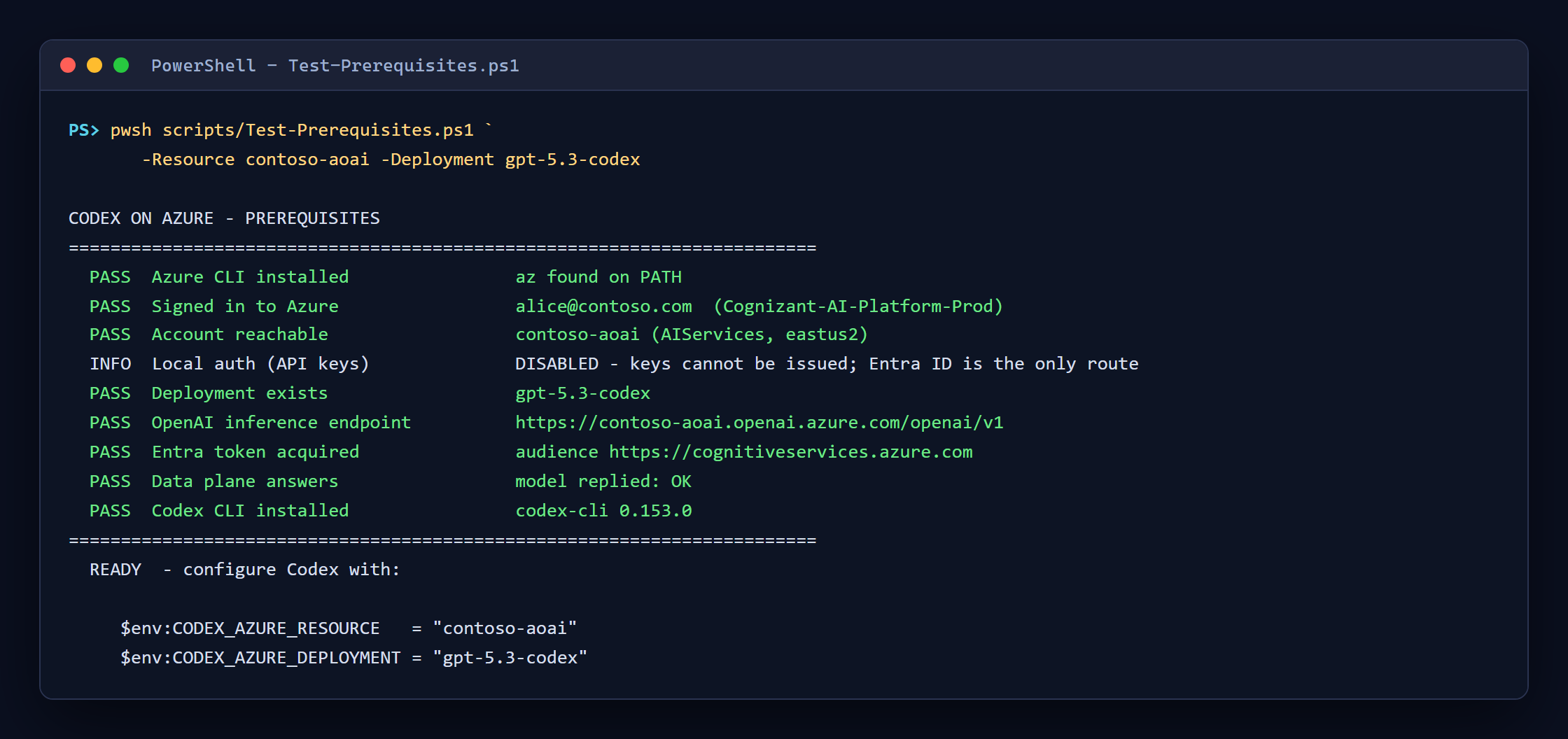
Run it with no parameters and it lists the accounts you can see; with -Resource only and it lists
that account’s deployments. Exit codes are 0 ready, 2 needs a parameter, ≥1 failed — so it
drops into a pipeline without anyone reading the output.
Tip
Local auth (API keys): DISABLEDis not a problem to solve. It is the reason to use Entra ID, and a better governance posture than a shared key. Microsoft Learn states Entra ID is not available for Codex — that means no native integration. Anaztoken injected into the variable Codex reads does authenticate, because Codex sends it asAuthorization: Bearer. The previous post covers that measurement in detail.
Step 2 — Point Codex CLI at the deployment
npm link                                            # puts codex-azure on PATH
$env:CODEX_AZURE_RESOURCE   = "contoso-aoai"
$env:CODEX_AZURE_DEPLOYMENT = "gpt-5.3-codex"
codex-azure -- exec "summarise this repo"
The generated provider block is the part worth reviewing in a design review:
model_provider = "azure"
[model_providers.azure]
base_url = "https://contoso-aoai.openai.azure.com/openai/v1"
env_key  = "AZURE_OPENAI_API_KEY"     # a variable NAME; holds an Entra token here
wire_api = "responses"
Step 3 — Validate the IDE extension
This is the surface people assume is different from the CLI. It is not. The VS Code extension
bundles its own codex binary, the same build as the CLI, and OpenAI’s docs confirm it reads
the same settings: “Codex settings control agent behavior shared with Codex CLI, including the
model… Codex reads these settings from config.toml.”
So it can be validated directly — by running the extension’s own engine against Azure:
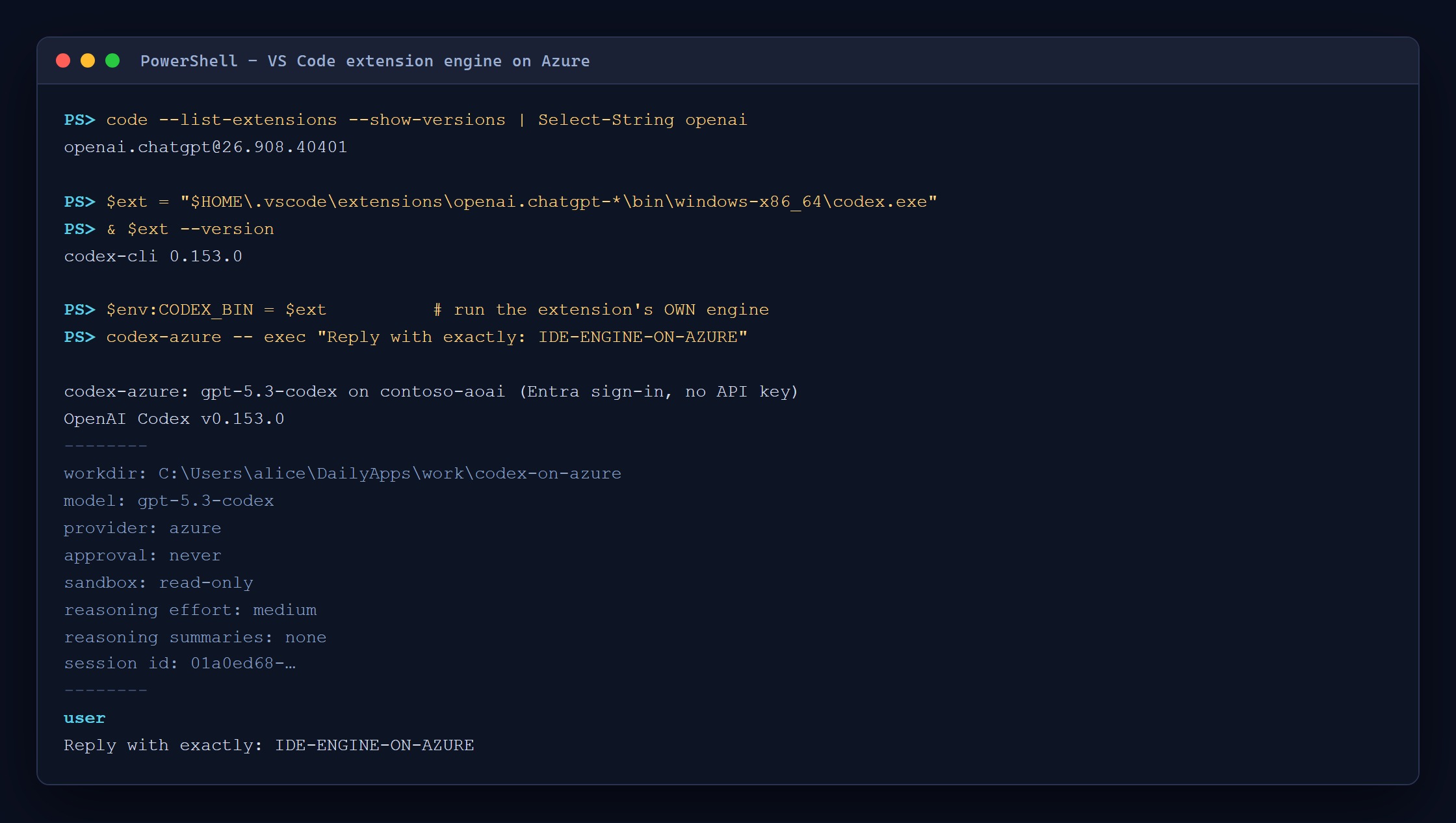
provider: azure, from the binary the IDE actually uses. For day-to-day use you simply configure
~/.codex/config.toml and the extension picks it up; launching VS Code from a shell where the
credential variable is set keeps the token available to it.
Step 4 — Prove it, with Azure’s evidence and not your own
This is the step that changes a compliance conversation. Configuration shows intent. An auditor will ask what actually happened.
Test-InferenceBoundary.ps1 reads Azure Monitor metrics for the account, sends one uniquely marked
request, then polls until the counters move:
pwsh scripts/Test-InferenceBoundary.ps1 -Resource contoso-aoai -Deployment gpt-5.3-codex
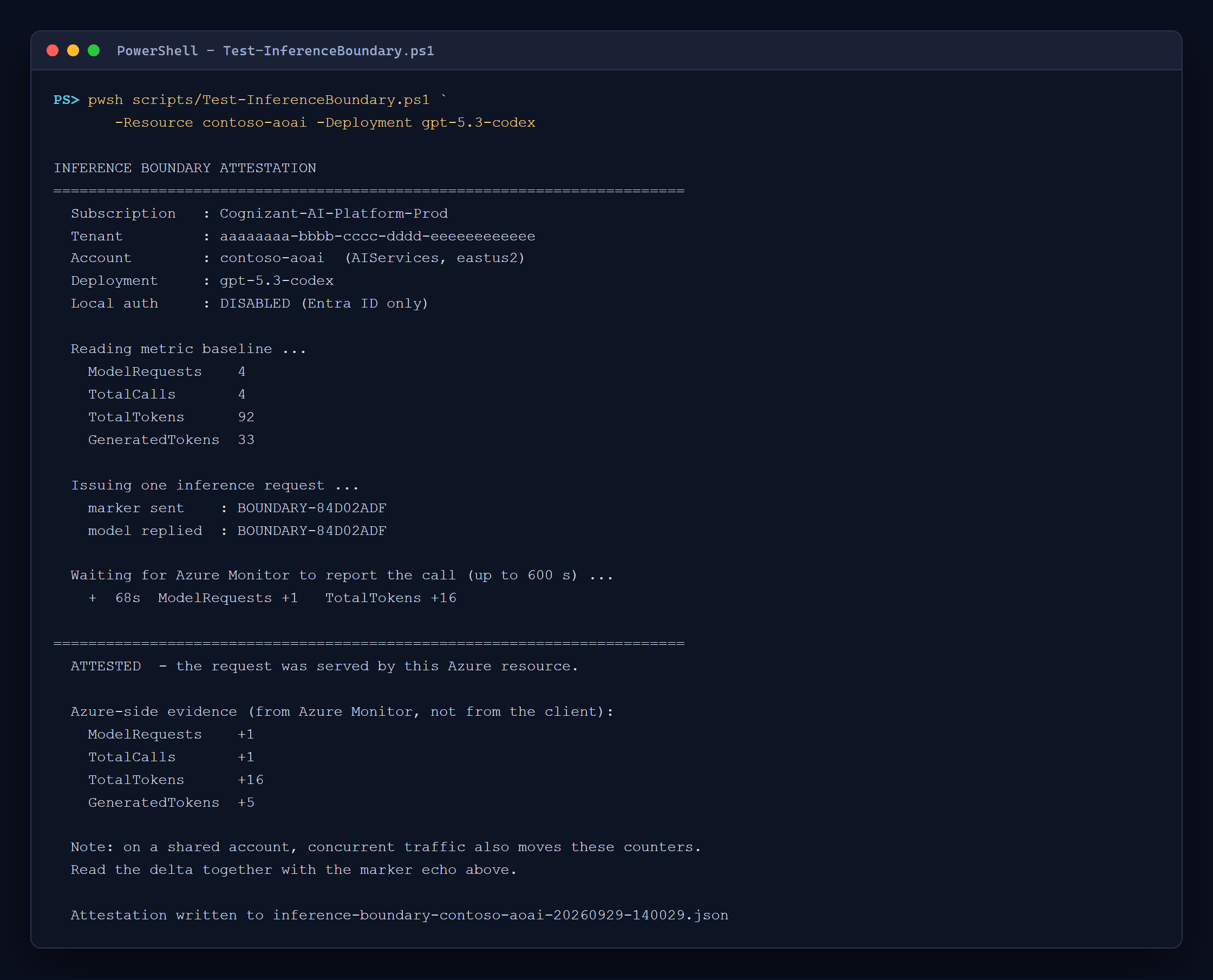
The marker came back, and Azure’s own telemetry recorded the call on that resource 68 seconds later. It writes a timestamped JSON artifact for the compliance record:
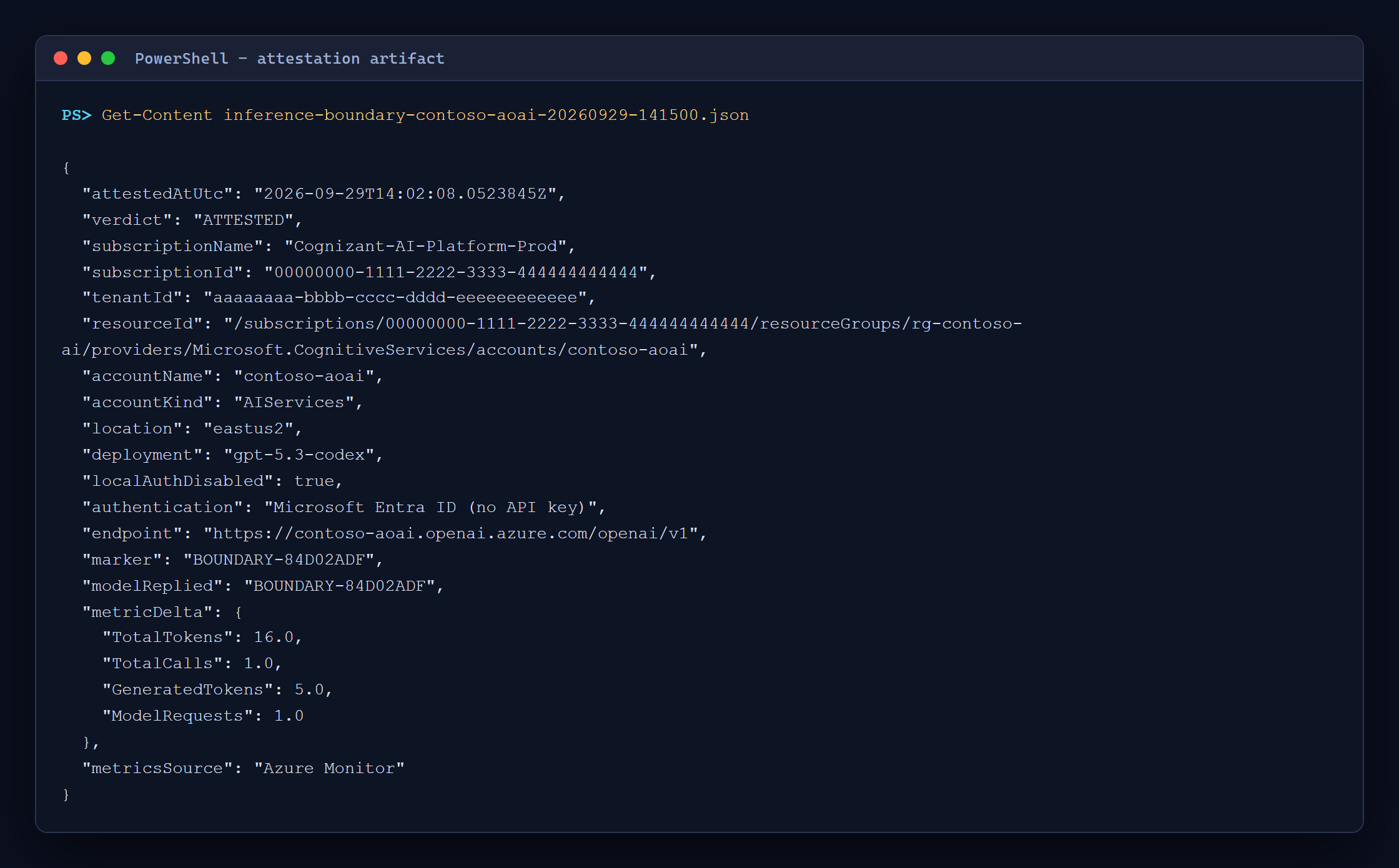
Note — what this evidence does and does not prove The marker proves the response path. The metric proves the resource served traffic in that window. It does not, by itself, prove the counter movement came from this request rather than concurrent traffic on a busy shared account. Read them together, or run against a quiet account. The script prints that caveat itself rather than overstating the result.
Two traps found while building it, both worth knowing:
AzureOpenAIRequestsstays empty on AI Services accounts. The metrics that actually move areModelRequests,TotalCalls,TotalTokens,GeneratedTokens. My first attestation reported zero against calls I had just watched succeed.- Azure Monitor lags. Expect 60–120 seconds. An attestation that polls once and gives up will report a false negative.
What to tell the customer
| They asked for | Reality |
|---|---|
| ChatGPT Enterprise Chat on our Azure | Not available. OpenAI-hosted; only regional data/inference residency |
| ChatGPT Work on our Azure | Not available; narrower than Chat, not broader |
| Codex cloud on our Azure | Not available. Model is fixed by product design |
| Codex for developers on our Azure | Available and provable — CLI and IDE extension |
| OpenAI models with data in our tenant | Available — Azure OpenAI in Microsoft Foundry, direct |
The honest framing is that these are two different products:
- ChatGPT Enterprise — per-seat SaaS, billed by OpenAI, running on OpenAI infrastructure, with OpenAI’s governance controls (EKM, residency, compliance API).
- Azure OpenAI in Microsoft Foundry — consumption billed by Microsoft through the customer’s own subscription, inference inside their tenant, their RBAC, their network controls, their logs. Per Microsoft: prompts and completions “are NOT available to OpenAI or other providers of Models sold by Azure” (Learn).
If the requirement is genuinely “data must not leave our governed boundary”, the second is the answer, and the chat UI is not part of it. If the requirement is “our developers want Codex and our security team wants the traffic in our subscription”, that is fully satisfiable today — and Step 4 gives you the evidence.
Troubleshooting
| Symptom | Cause and fix |
|---|---|
Preflight passes but Codex gets 401/403 |
Control-plane read succeeded, data-plane role missing. Assign Cognitive Services OpenAI User |
Failed to list key. disableLocalAuth is set to be true |
Expected. Use Entra ID |
| Attestation says INCONCLUSIVE | Azure Monitor lag. Raise -TimeoutSeconds, or re-run |
| Attestation metrics always zero | You are reading AzureOpenAIRequests on an AI Services account. Use ModelRequests |
OperationNotSupported |
wire_api must be responses |
codex vanished after npm install -g |
latest may be a build with "bin": null. Pin @openai/codex@0.153.0 |
Reference
- 💻 Scripts and wrapper: github.com/naveenneog/codex-on-azure
- 📄 Codex with Azure OpenAI — Microsoft Learn
- 📄 Azure OpenAI data privacy — Microsoft Learn
- 📄 OpenAI Enterprise Key Management
- 📄 OpenAI data and inference residency
- 📄 Codex workspace model availability
- 📄 ChatGPT Gov
Setting it up for the first time? Start with Run Codex CLI on Azure OpenAI Without an API Key.