cordless v0.7: Attention State — Know Which of Your 8 Agent Sessions Needs You
When you run eight Claude Code and Codex sessions at once, the hard part isn't starting them — it's knowing which one is waiting for you. cordless v0.7 infers each session's attention state (working / idle / waiting / bell / finished) from its output, badges and sorts them, and can ping your phone via ntfy — plus scrollback search, copy-last-output, and named workspaces.
TL;DR — cordless is a CLI-first tool that manages your remote terminal / coding-agent sessions and puts them on your phone. v0.7 adds the thing that actually matters when you’re juggling many agents: per-session attention state. The daemon watches each session’s output and infers whether it’s working, idle, or waiting for you — then badges it, sorts attention-first, and can push a notification (ntfy / webhook) so you get pinged instead of babysitting. Also new: scrollback search, copy last output, and named workspaces. Designed with GPT-5.6 Sol, built with GitHub Copilot CLI.
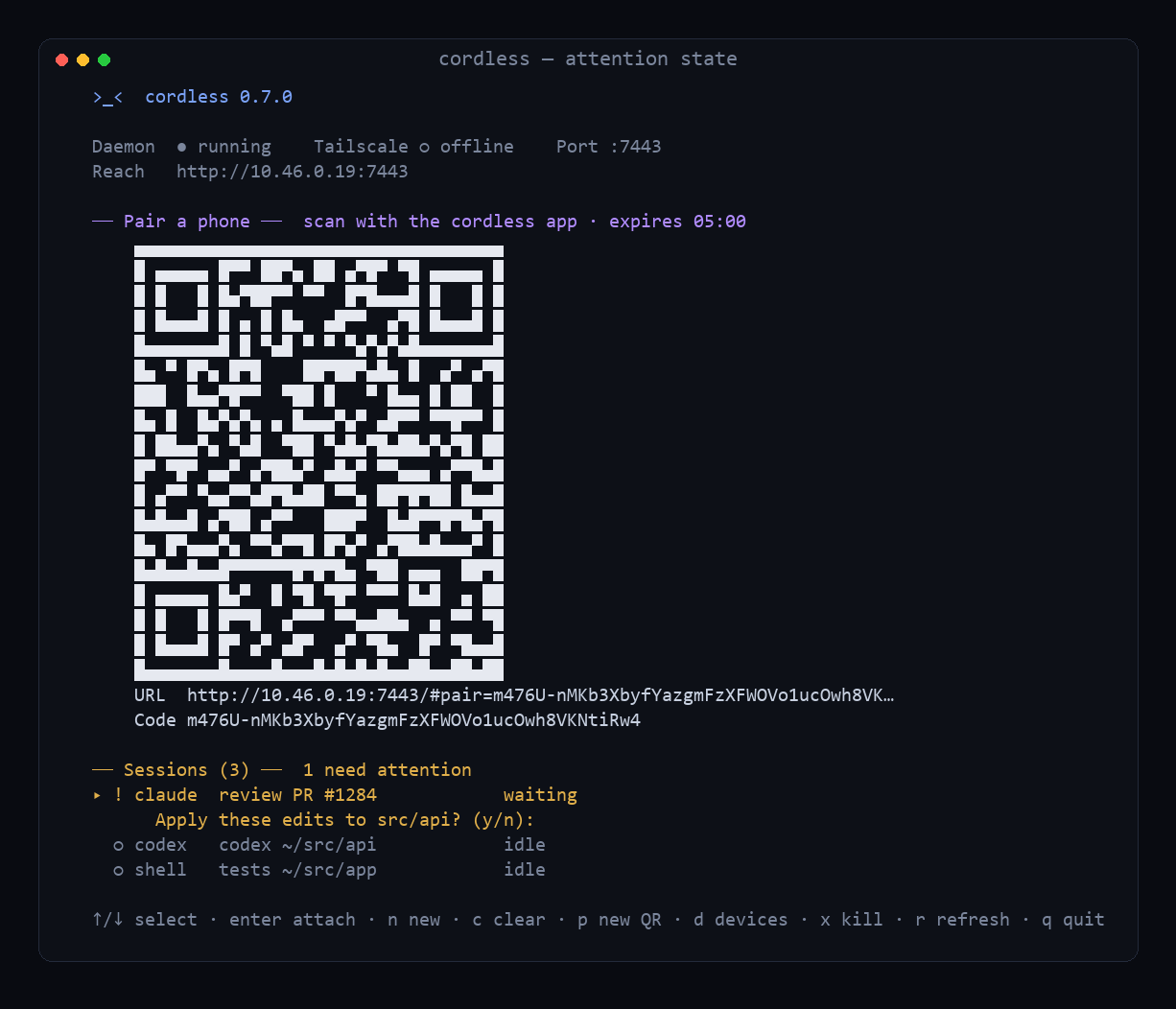
Here’s the real problem with running eight coding agents at once: they keep stopping to ask you things. “Apply these edits? (y/n)”. “Run the tests?”. One finishes; another hits an error; a third is still churning. You can’t watch eight terminals. So you tab through them, and half the time you’re staring at a session that’s happily working while another has been blocked on a yes/no for four minutes.
v0.7 is my answer to that.
Attention state
cordless now tracks, for every session, two things:
- activity —
working,idle, orexited - attention —
waiting(a prompt),bell,finished, or nothing
The daemon infers this purely from the session’s PTY output — no shell integration, no hooks required. In the dashboard, sessions are badged and sorted attention-first, so the one that needs you floats to the top with a !:
── Sessions (3) ──  1 need attention
▸ ! claude  review PR #1284            waiting
      Apply these edits to src/api? (y/n):
  ○ codex   codex ~/src/api            idle
  ○ shell   tests ~/src/app            idle
Press c to mark it handled; sending input clears it automatically (answering is handling it). On the phone you get the same badges. cordless sessions --attention lists just the ones asking for you.
The hard part: what counts as “waiting”?
This is where I leaned on Sol the most, because naive detection is a false-positive machine. A silent build looks “stuck”. A shell sitting at its prompt looks “ready” but isn’t asking anything. vim and htop repaint constantly. The rules we landed on are deliberately conservative:
- A trailing shell prompt (
$,#,>,❯) is readiness, not attention. Never notify on it. - A silent session is idle, not waiting — a paused agent, a long build, and a sleeping process all look the same, so we don’t guess.
- We only raise waiting on high-confidence confirmation/agent prompts —
(y/n), “Continue?”, “Do you want me to…?”, “Enter your password:” — matched against the last non-empty line after a short quiet window. - Alternate-screen apps (vim/htop/less) suppress prompt heuristics entirely — better to miss a full-screen prompt than to cry wolf.
- BEL (
^G) is an explicit signal, so it’s trusted — but ignored during a session’s first few seconds and right after a keypress (startup and invalid-key beeps). - finished is heuristic and scoped to
claude/codex: back at a shell prompt after real activity. It’s labelled low-confidence and can be turned off.
The whole classifier is a pure, unit-tested module — 41 fixture checks across shells, pagers, and Claude/Codex-style prompts. And QA earned its keep: I caught a bug where a prompt appearing within two seconds of a keypress was silently dropped (the input-grace guard also skipped the whole quiet cycle). A cross-platform live test now locks that path shut.
Get pinged — without any cloud
Badges are great when you’re looking. When you’re not, v0.7 can notify you. Point it at an ntfy topic (the ntfy phone app pushes it) or a generic webhook (Slack/Discord/automation) in config.json, and cordless POSTs when a session transitions to waiting / bell / finished. cordless notify test validates it.
cordless owns no cloud for this, and the anti-spam is strict (Sol was insistent): one notification per state revision, a 60-second per-session cooldown, a 5-per-minute global cap, optional quiet hours, and no terminal output in the payload by default (it can contain code or secrets). Topic and webhook URLs are treated as secrets and never logged. Delivery is async with a short timeout — a broken webhook can never stall your terminal.
Three more coder niceties
- Copy last output:
cordless output <id> --lines 50 --copygrabs a session’s recent output to your clipboard (cross-platform). - Scrollback search:
cordless search <id> "TypeError"scans a session’s retained buffer. - Workspaces:
cordless workspace save api-featuresnapshots your running sessions (profile + cwd + title);cordless workspace open api-featurerelaunches the whole layout — “Claude on api, Codex on web, a tests shell” — in one command.
How it was built
Same loop, sharpened: me on GitHub Copilot CLI, Sol as the design partner — and this sprint I kept it honest about version control. Each feature was built on its own branch (feature/attention-state, feature/notifications, feature/output-search, feature/workspaces), tested, and merged as a unit. The daemon’s test harness grew to 16 suites — pure attention heuristics, live prompt/idle detection, notifier anti-spam + delivery (injected fetch, no network), scrollback, workspaces, plus the existing protocol/security/restore coverage — and CI runs all of it on Windows and Linux, then builds and smoke-tests the self-contained binary.
The good
The feeling I was after: glance at cordless (in the terminal or on my phone) and instantly know which agent needs me — not by tabbing through eight sessions, but because the one waiting is at the top with a ! and, if I’ve wandered off, my phone buzzed. Everything else — search, copy, workspaces — is in service of the same thing: running a lot of agents without drowning in them.
Try it
- ▶️ Live / docs: naveenneog.github.io/cordless
- 💻 cordless CLI (Windows / Linux, no Node needed): github.com/naveenneog/cordless/releases/latest
- 📦 Android APK: github.com/naveenneog/cordless/releases/latest
- 🧑💻 Source: github.com/naveenneog/cordless
Part of the #AI4Good series. Built one day at a time. — @naveenneog