
Carving a Glowing 3D Army from Single Images: Hugging Face + Blender, driven by Copilot CLI Autopilot
How I turned one AI concept image per piece into a game-ready, glowing 3D army for Chaturanga — using a free Hugging Face Space for image-to-3D, headless Blender for texture, and GitHub Copilot CLI in autopilot mode to drive the whole thing. Includes the honest journey: the tools that failed, Blender's real limits, and rotating hero renders.
TL;DR — One
gpt-image-2concept image per piece → a free Hugging Face Space (tencent/Hunyuan3D-2) turns it into a raw 3D mesh → headless Blender projects the concept back on as texture → a web-ready GLB that glows in Three.js. No local GPU. All of it — the research, the dozens of scripts, the Hugging Face calls, the Blender runs, and this very blog post and its auto-publish to DEV — was orchestrated by GitHub Copilot CLI in autopilot mode.
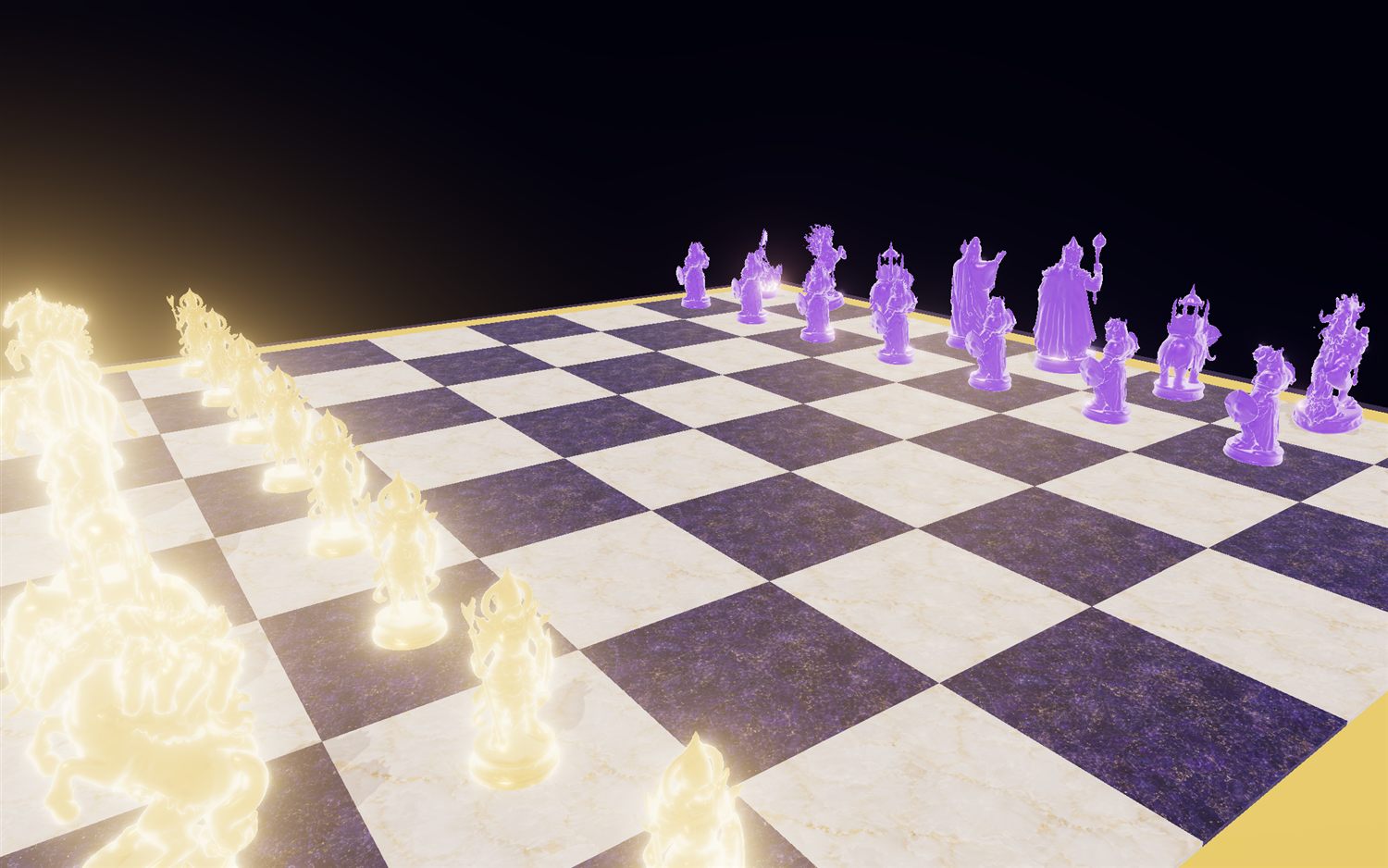
I’ve been building Chaturanga — the ancient Indian “game of the four divisions,” played with modern chess moves but authentic piece identities (Raja, Mantri, Gaja, Ashva, Ratha, Padati), where every world teaches a moral lesson. The board above is the payoff. The hard part was the pieces: I wanted carved-ivory war figures with real silhouettes, in four themed armies, that spin in a WebGL inspector — and I wanted them for free, on a laptop with no GPU, in a fully scriptable, reproducible way.
This is the story of how that pipeline came together, including the parts that didn’t work.
The pipeline at a glance
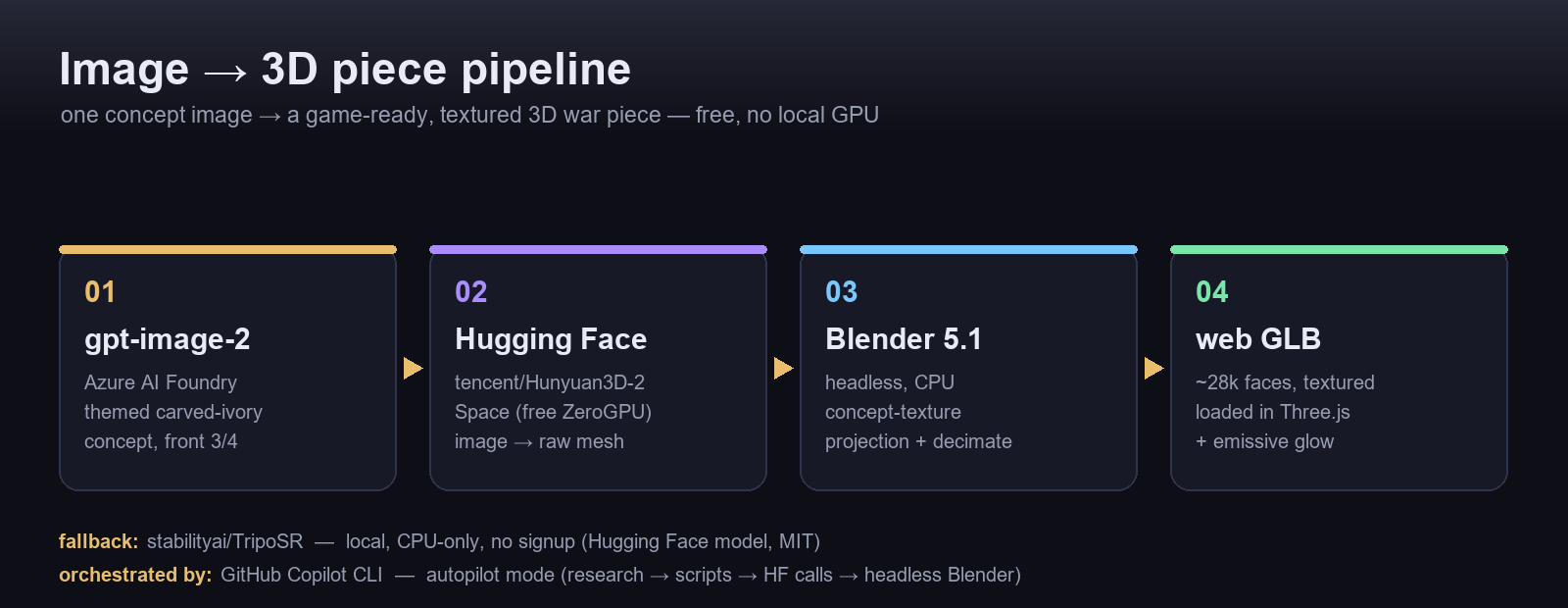
Four stages, each free and headless:
- Concept — Azure
gpt-image-2renders a themed, carved-ivory concept per piece (front 3/4, white background). - Image → 3D — the concept goes to a Hugging Face Space that runs image-to-3D on donated GPU and hands back a mesh.
- Texture — Blender 5.1, headless on CPU, projects the concept image onto the mesh as its surface.
- Ship — export a decimated, textured GLB and load it in Three.js with a little emissive glow.
Step 1 — Concept art with gpt-image-2
Each piece starts as a prompt describing a museum figurine. The key is a clean, front-facing 3/4 view on a plain background — that is exactly what image-to-3D models want.
pieces = {
  "raja":   "A carved ivory Indian chess piece: a standing king with crown, parasol and mace, Chaturanga style, white background, front 3/4 view, studio lighting",
  "ashva":  "A carved ivory Indian chess piece: Hanuman mid-leap raising a mace, ornate, Chaturanga style, white background, front 3/4 view",
  "gaja":   "A carved ivory Indian chess piece: a war elephant with a howdah canopy, Chaturanga style, white background, front 3/4 view",
  # ... mantri, ratha, padati
}
# -> Azure AI Foundry: POST /openai/deployments/gpt-image-2/images/generations
Step 2 — Image → 3D, on a free Hugging Face Space
This is the heart of it. Instead of buying GPU time, I call the public tencent/Hunyuan3D-2 Space through its Gradio API. The Space runs the heavy diffusion-to-mesh step on free ZeroGPU, and I just pull back a .glb:
from gradio_client import Client, handle_file

client = Client("tencent/Hunyuan3D-2", hf_token=HF_TOKEN)   # token optional; helps with rate limits
result = client.predict(
    image=handle_file("refs/raja.jpg"),
    steps=30, guidance_scale=5.0, seed=1234,
    octree_resolution=256, check_box_rembg=True,
    num_chunks=8000, randomize_seed=False,
    api_name="/shape_generation",     # geometry only — fast; texture is done later in Blender
)
# result -> a raw .glb mesh, generated on someone else's GPU, for free
I batch all six pieces over one reused client connection, with retries for transient ZeroGPU queue errors. Geometry-only (/shape_generation) is the fast path; I deliberately skip the Space’s texture step because I get sharper, on-brand results projecting my own concept image in Blender (Step 3).
No-signup fallback: for a path that needs zero accounts, I keep stabilityai/TripoSR (MIT) running locally on CPU. It’s the only open image-to-3D model I found that’s genuinely CPU-feasible on Windows — a few minutes per piece, softer surface, no PBR, but a reliable offline safety net.
python tooling/triposr_run.py refs/raja.jpg --out out/ --resolution 256
# TripoSR on CPU: marching cubes via PyMCubes (no native build), exports a vertex-coloured GLB
Bonus: discovering Spaces from inside the terminal
Copilot CLI now has the Hugging Face MCP server wired in, so I can search the Hub without leaving my shell. Asking it for image-to-3D Spaces returns exactly the shortlist this project lives on:
| Space | What it does | ⭐ |
|---|---|---|
microsoft/TRELLIS.2 |
High-fidelity 3D from images | 1.7k |
tencent/Hunyuan3D-2 |
Text- & image-to-3D (what I use) | 3.3k |
TencentARC/InstantMesh |
Image → 3D in ~10s | 1.6k |
That turns “which model should I use?” into a two-second query instead of an afternoon of tab-hopping.
From flat concept to spinning figure
Here’s the whole point in one frame — the gpt-image-2 concept on the left, the Hugging Face + Blender result on the right:
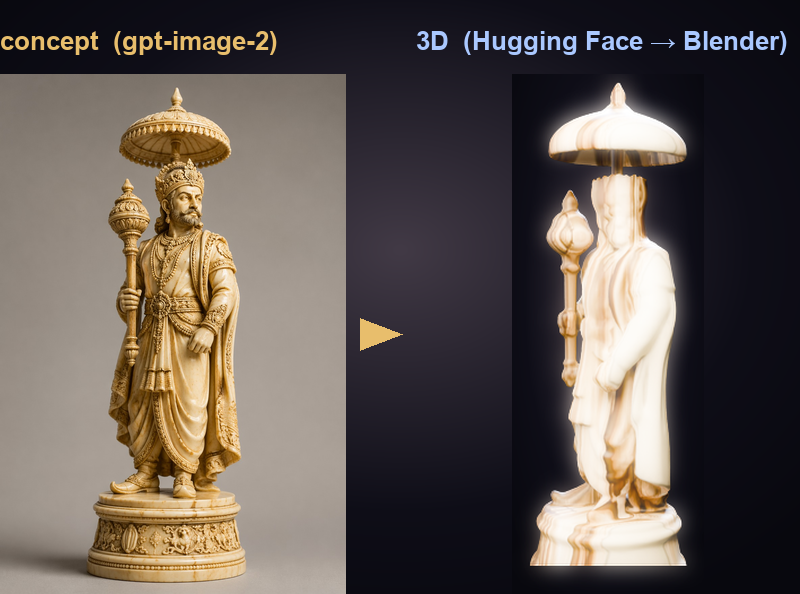
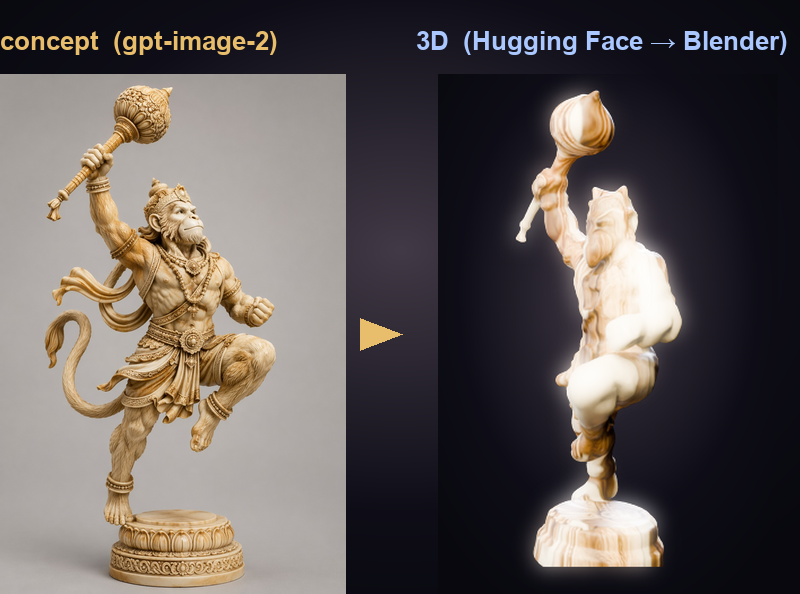
And because a chess piece has to survive being spun around in a 3D inspector, here they are on the turntable:
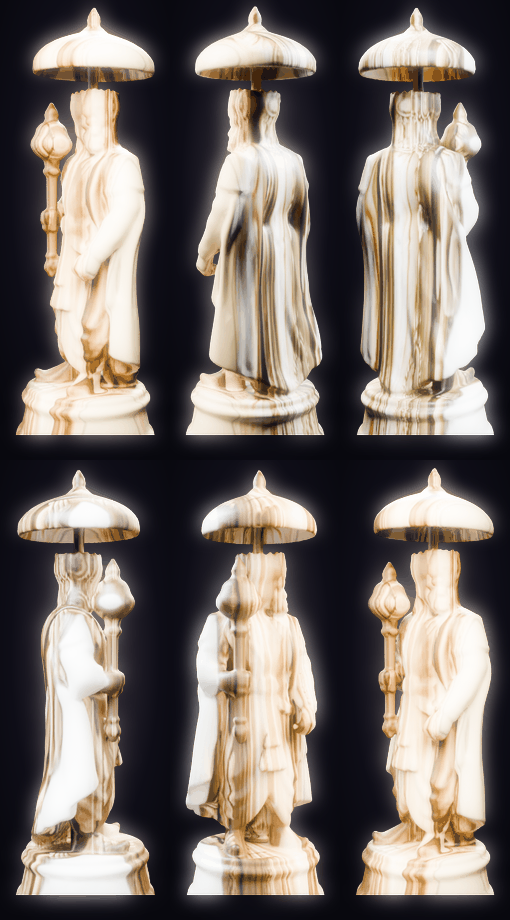
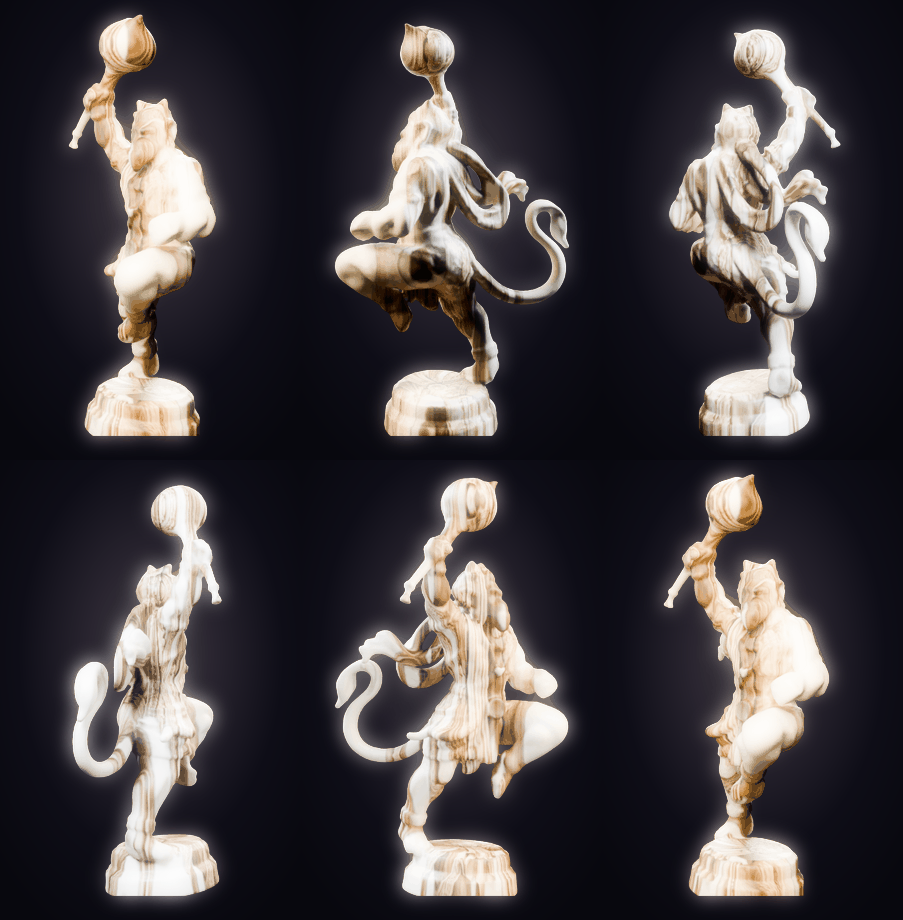
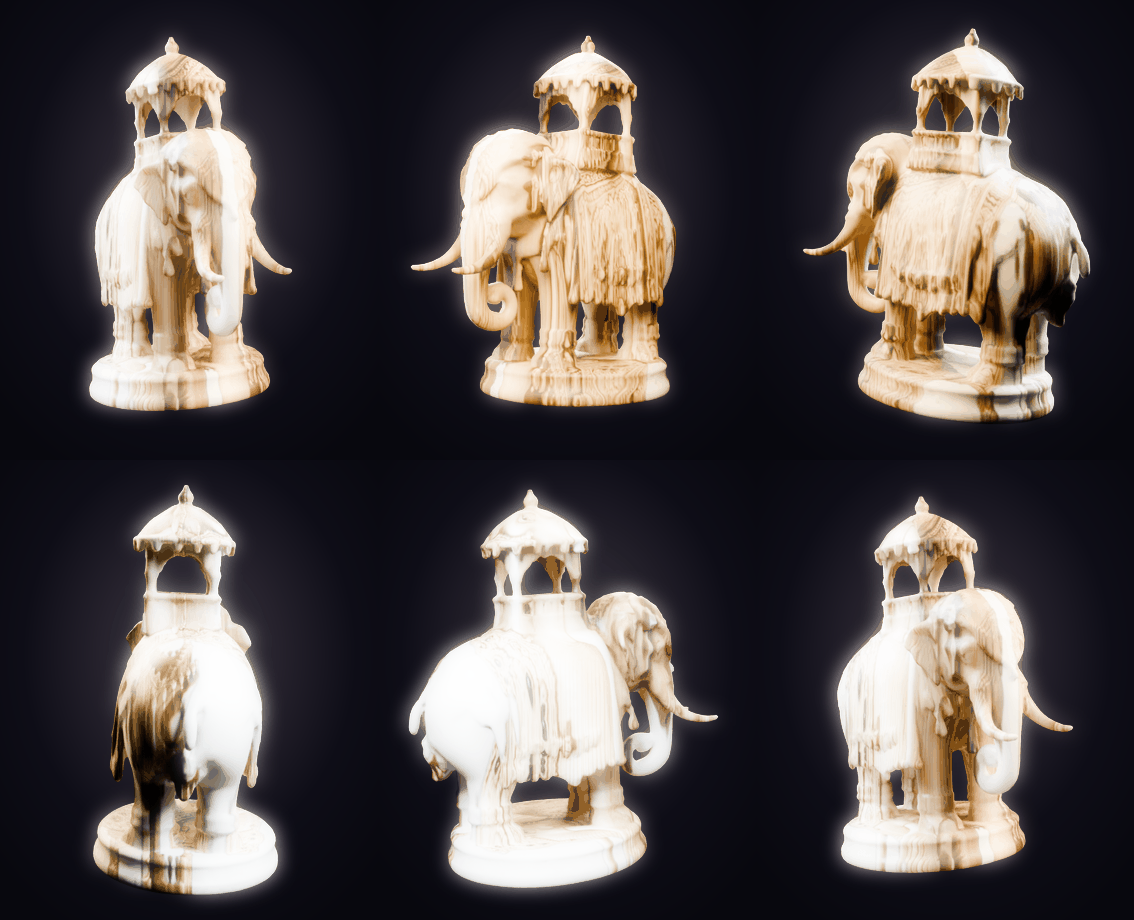
Step 3 — Where Blender earns its keep (and where it fights back)
The Hugging Face mesh has a correct silhouette but a soft, under-detailed surface. All the crisp carving detail lives in the original concept image. So Blender’s job is concept-texture projection: orient the raw mesh, frame an orthographic camera on its “front,” and set each vertex’s UV to that camera’s projection — so the concept image becomes the surface, razor-sharp from the front.
blender -b --python tooling/blender/texture_project.py -- \
    raw/raja_hunyuan.glb refs/raja.jpg web/raja.glb preview.png
# headless, CPU-only: orient -> project concept as texture -> decimate to ~28k faces -> export GLB
Blender is fantastic here, but the road was bumpy. The honest limitations:
- Back faces get a mirrored projection. Single-camera projection is perfect head-on; the reverse side is a mirror of the front. For pieces viewed from above on a board, it’s an acceptable trade — but it is a trade.
- Blender 4 → 5 broke my material scripts. The Principled BSDF input sockets were renamed: it’s
Subsurface WeightnotSubsurface,Specular IOR LevelnotSpecular. Scripts that ran on 4.x threwKeyErroron 5.1 until I re-bound every socket. (Lesson:print(bsdf.inputs.keys())before you touch anything.) - Eevee Next won’t render headless on Windows.
blender -bwith the new Eevee crashes with an access violation — it wants a GPU context that a background process doesn’t have. Cycles on CPU renders fine headless; every image in this post (including the turntables) is Cycles-CPU. - No native build allowed. To keep the whole thing laptop-reproducible, marching cubes runs through PyMCubes rather than a compiled isosurface extension.
The detour: “why not just build them in Blender?”
Early on I seriously tried Blender-only procedural modeling — skin modifier over a skeleton, geometry nodes, PBR node graphs baked from the concept. It’s fully scriptable and GPU-free… and it produced primitive blobs after hours of fiddling. Verdict: great for finishing, wrong tool for creating organic figures. That failure is exactly why the Hugging Face step exists.
The tools I tried — and where they hit a wall
Before settling, I benchmarked the field. The constraints were brutal on purpose: free, Windows, no GPU, scriptable.
| Tool | Route | Verdict under my constraints |
|---|---|---|
| Hunyuan3D-2 (HF Space) | image→mesh, free ZeroGPU | ✅ Winner — GPU-quality geometry, no local GPU |
| TripoSR (local) | image→mesh, CPU | ✅ Fallback — only CPU-feasible local model; soft, no PBR |
| Meshy AI | REST API, 200 free credits/mo | ⚠️ Great quality, but ~6 textured pieces/mo, CC-BY |
| Tripo AI | REST API, 300 credits/mo | ⚠️ Good, but 15 downloads/mo, 1 concurrent task |
| Rodin (Hyper3D) | REST API, pay-on-export | ⚠️ Best-in-class detail, but credits burn on download |
| Stability SF3D | API + local | ⚠️ ~2 free API gens; local is ~3.9 GB, slow on CPU |
| InstantMesh / TRELLIS / Wonder3D | local | ❌ Not CPU-feasible — CUDA-only, hours on CPU |
The pattern is clear: the hosted API services are excellent but metered, and the best local models need a GPU I don’t have. The one escape hatch is a community-hosted Hugging Face Space — the model runs on donated GPU, and I pay nothing but a queue wait.
The meta-story: this was all built in Copilot CLI autopilot mode
Here’s the part I keep coming back to. I didn’t hand-write most of this. I drove GitHub Copilot CLI in autopilot mode — where the agent runs shell commands, scripts, and tools autonomously, multi-step, without stopping for approval at each move. In practice that looked like:
- a research sub-agent fanning out across 13 image-to-3D tools and returning a sourced comparison table;
- the agent writing and running
hf_batch.py, invoking the Hunyuan3D-2 Space, and retrying on ZeroGPU hiccups; - headless Blender runs for texture projection and the turntable renders you see above — launched, inspected, and re-tuned by the agent (it caught the Eevee-headless crash and switched to Cycles itself);
- and finally, this blog — rendered GIFs, pipeline diagram, prose — plus a GitHub Actions workflow that auto-publishes it to DEV on every push.
Autopilot turns “I have an idea for a pipeline” into “the pipeline, its assets, and its write-up all exist,” with me steering rather than typing every command.
Results & what’s next
The payoff is a full four-world army — Kurukshetra, Ramayana, Kalinga, Devasura — each piece a real 3D figure with a themed material and a bit of emissive bloom so the Devas literally glow.
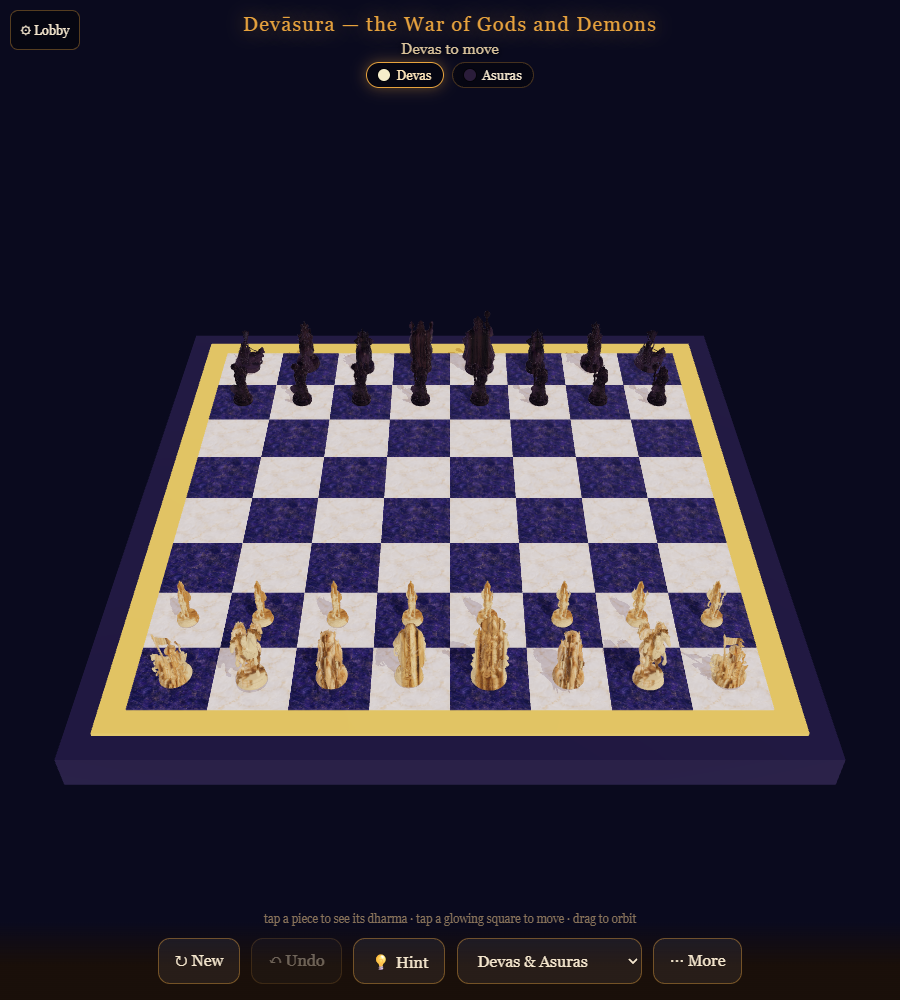
Try it: the game is live at naveenneog.github.io/Chaturanga (3D + 2D, AI opponent, coach, openings trainer, Android APK).
Steal the pipeline: gpt-image-2 → tencent/Hunyuan3D-2 Space → Blender projection → GLB. It costs nothing, needs no GPU, and every step is a script. If you’re generating game assets, product mockups, or avatars, a free Hugging Face Space is the cheat code — and Copilot CLI autopilot is the thing that stitches it all together.
Built one day at a time. — @naveenneog